My Combo
My Combo widget is a front-end widget that provides a personalized betting experience and a simplified way to discover and place multi bets. The main feature of the widget is the user interface that allows punters to quickly add multi bet combinations to the bet slip, find new ones or create their own on the fly.
- Punters past activity
- General betting trends
- Overall betting volume
- Seasonal variations
- New discovery and engagement patterns
Personalization requirement
To enable personalized recommendations (the recommended type), you must provide a unique user identifier. When no user ID is provided, the widget will fall back to popular recommendations.
#Key Capabilities
Simple Interface
Intuitive UI that simplifies the discovery and placement of multi-leg accumulators.
AI Personalization
Tailors the most popular multi-bet combinations to each punter's personal preferences.
Discovery Engine
Surface high-engagement betting opportunities that users might have otherwise missed.
Live & Pre-match
Full support for real-time in-play accumulators and upcoming pre-match event bundles.
Seamless Integration
Rapid client-side setup with minimal configuration needed for basic deployment.
Full Customization
Extensive styling and configuration options to ensure the widget feels native to your brand.
#UI and Interaction Options
Flexible Layouts
Switch between focused single-card views or high-density horizontal carousels.
Instant Bet Slip
One-click integration to add entire multi-leg combos directly to the operator's bet slip.
Smart Discovery
Users can "Load New Combo" or refresh individual legs to find the perfect bet on the fly.
Interactive Editing
Optional support for adding or removing legs directly within the combo card interface.
#Settings and Customization
- Version: mixed match multi bets or same match multi bets (same match depends on API readiness)
- Recommendation type: recommended (default) or popular (when user ID is not available)
- Sport filter
- Time span: live, pre-match, or hours until kickoff
- Widget name
- Add/remove legs toggle
- Load new combo button
- Load different leg button (not compatible with add/remove legs)
- Ticket length: maximum ticket length (default 4, minimum 2)
- Maximum combined odds threshold
- Mobile/desktop mode
#Styling Options
- Elements (container, cards, buttons): colors, rounded corners, icons
- Text: font styles and colors
#Requirements
-
Access to the client API
-
Required endpoints: User ID, Odds, Bet slip content, combined odds for multi bets
-
Requires an adapter to be registered via
SIR('registerAdapter', '{ADAPTER_NAME}'). See the adapter overview: https://apidocs.sportradar.online/resources/widgets/docs/adapter/Overview -
widget-name:
betRecommendation.myCombo
Environment Requirements
Technical Requirements:
- JavaScript enabled
- XMLHttpRequest support for data fetching
- CSS3 support for styling and animations
Supported Sports
- American Football NFL only (including NCAA)
- Aussie Rules
- Badminton
- Bandy
- Baseball & MLB
- Basketball & NBA (including NCAA)
- Beach soccer
- Beach Volleyball
- Cricket
- Curling
- Cycling
- Darts
- Field Hockey
- Floorball
- Futsal
- Golf
- Handball
- Ice Hockey & NHL
- Pesapallo
- Rugby (League & Union)
- Snooker
- Soccer
- Squash
- Table Tennis
- Tennis
- Volleyball
- Waterpolo
- Winter sports
#Main Configurable Features
See the My Combo widget demo. Illustrations of main layout variants and bet types with relevant property values below.
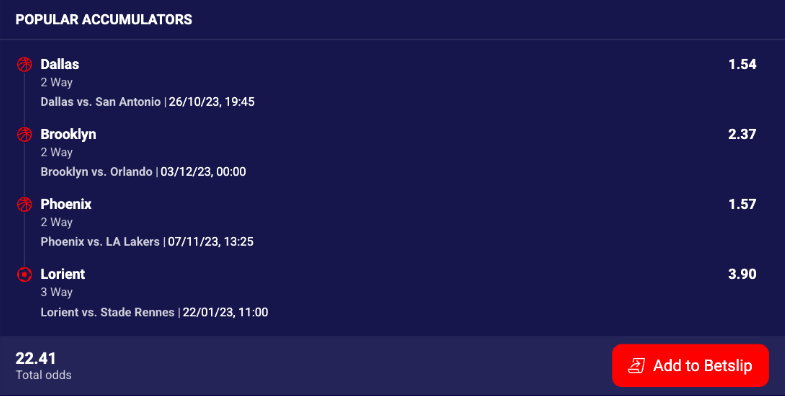
Single combo card showing multi-leg accumulator with combined odds and add to bet slip button.
#API Reference
#Basic Properties
Expanded Table
| Property | Type | Default | Description |
|---|---|---|---|
user | string|number | 0 | User identifier for personalized combo recommendations. |
productTitle | string | undefined | Title text displayed in widget header. |
showHeader | boolean | true | Controls visibility of widget header. |
showRefreshButton | boolean | false | Enables refresh functionality for new combos. |
numberOfCards | number | 10 | Number of combo cards for carousel layout (2-20). |
layout | string | Required | Display mode: "single" or "carousel". |
editLegAction | string | undefined | Enables leg editing: "replace" or undefined. |
betType | string | "mixed" | Combo type: "mixed" (cross-event) or "same" (bet builder). |
minTicketLength | number | 3 | Minimum number of legs per combo (2-12). |
maxTicketLength | number | 4 | Maximum number of legs per combo (2-12). |
maxAllowedOdds | number | undefined | Maximum allowed combined odds. |
minRequiredLegOdds | number | undefined | Minimum required combined odds. |
eventId | string|number | undefined | Event identifier (required when betType: "same"). |
onItemClick | function | undefined | Callback for combo card interactions. |
debug | boolean | false | Enables debug mode with console logging. |
Extended Properties
Expanded Table
| Property | Type | Default | Description |
|---|---|---|---|
buttonIcon | string|false | undefined | Custom icon URL for "Add to Bet Slip" button on combo cards. When provided, displays custom icon alongside button text. When false, hides icon entirely (text-only button). When undefined, uses default plus icon. |
filters | object | Required | Configuration object for sport and league filters. See below for detailed structure. |
sportsMapping | object | undefined | Maps client's sport identifiers to Sportradar sport IDs. Object with keys as client sport IDs (string/number) and values as Sportradar sport IDs. Example: {101: 1, 102: 2} maps client IDs 101/102 to soccer/basketball. Allows using client's sport taxonomy in filter configurations. |
Filters Object
The filters object controls which sports and leagues generate combo recommendations.
Expanded Table
| Property | Type | Default | Description |
|---|---|---|---|
sport | object | Required | Sport filter configuration. |
sport.available | array<string|number> | [] | Required. Array of Sportradar sport IDs to include in combo generation. Empty array shows all available sports. Example: [1, 2, 5] for soccer, basketball, tennis. AI generates combos using events from specified sports only. See Sports Reference. |
league | object | undefined | League/tournament filter configuration. |
league.available | array<string|number> | undefined | Array of Sportradar tournament/league IDs to include in combo generation. When provided, AI generates combos using only events from specified leagues. Example: ["sr:tournament:17", "sr:tournament:7"] for Premier League and La Liga. See Getting Identifiers. |
Filters Example
{
  sport: {
    available: [1, 2, 5]  // Soccer, Basketball, Tennis
  },
  league: {
    available: [
      "sr:tournament:17",   // Premier League
      "sr:tournament:34",   // Bundesliga
      "sr:tournament:132"   // NBA
    ]
  }
}#Theming
Theming customization allows to tailor the appearance of Bet Recommendation widgets to meet specific needs and preferences. In the context of the Bet Recommendation widget, customization refers to the ability to modify the default styling of the widget by applying custom CSS properties to the various HTML elements that make up the widget.
Widget comes with pre-existing styling but can be customized by applying custom CSS properties to its different HTML elements. The widget's custom class selectors and supported CSS properties are listed below.
All custom classes must be nested within the .sr-bb.sr-br-mycombo selector class. This ensures that the custom styles only apply to that widget and not to other elements on the page.
#Custom Class Selectors
Expanded Table
| CSS class | Supported CSS properties |
|---|---|
srct-br-container | background-color, font-family |
srct-br-card | background-color, color, border-radius |
srct-br-header | background-color, color, border-radius, font-style |
srct-br-card__divider | border-color |
srct-br-eventinfo__icon | color |
srct-br-eventinfo__status | font-size, color |
srct-br-eventinfo__name | font-size, color |
srct-br-eventinfo__time | font-size, color |
srct-br-marketselectionbutton-outcometeamname | font-style, font-size, color |
srct-br-outcome__value | font-style, font-size, color |
srct-br-outcome__name | font-style, font-size, color |
srct-br-scoreboard | font-size, color |
srct-br-scoreboard__teams | font-size, color |
srct-br-scoreboard__datetime | font-size, color |
srct-br-footer | font-size, font-style, color, background-color, border-radius |
srct-br-widgetbutton | font-size, font-style, color, border-radius, padding, background-color |
srct-br-widgetbutton__icon | color, height, width |
#Integration
Mandatory Configuration
The filters property is required for this widget to function correctly. It defines the recommendation logic and basic data constraints.
Demo: Open demo
#Widget Setup
Basic single combo card with mixed events for anonymous users.
JavaScript
SIR("addWidget", "#my-combo-1", "betRecommendation.myCombo", {
  layout: "single",
  betType: "mixed",
  filters: {
    sport: {
      available: [1, 2],
    },
  },
});
HTML (data attributes)
<div
  class="sr-widget"
  data-sr-widget="betRecommendation.myCombo"
  data-layout="single"
  data-bet-type="mixed"
  data-filters='{"sport": {"available": [1, 2]}}'
></div>#onItemClick
The onItemClick callback is fired whenever the user interacts with the widget. The first argument is a target string that identifies the interaction type; the second argument is a data object containing contextual information.
Expanded Table
target value | Trigger | Key data properties |
|---|---|---|
"externalOutcome" | User clicks a single outcome button | externalEvent, externalMarket, externalOutcome |
"externalOutcomes" | User clicks multiple outcomes at once (e.g. combo card) | Array of { externalEvent, externalMarket, externalOutcome } |
"externalEvent" | User clicks an event header/card | externalEvent |
"externalCompetition" | User clicks a competition/league name | externalCompetition |
"goToBetSlip" | User clicks the "Go to Bet Slip" button (swipeBet only) | — |
"betSlipMode" | Bet slip mode changes between single and multi (swipeBet only) | value: "single" | "multi" |
SIR("addWidget", "#sr-widget", "betRecommendation.markets", {
  onItemClick: function (target, data) {
    if (target === "externalOutcome") {
      // Add single outcome to bet slip
      const { externalEvent, externalMarket, externalOutcome } = data;
      betSlip.add({
        eventId: externalEvent.id,
        marketId: externalMarket.id,
        outcomeId: externalOutcome.id,
      });
    } else if (target === "externalEvent") {
      // Navigate to event/match detail page
      window.location.href = `/matches/${data.externalEvent.id}`;
    } else if (target === "externalCompetition") {
      // Navigate to competition/league page
      window.location.href = `/league/${data.externalCompetition.tournament.id}`;
    }
  },
  filters: { recommendationType: { available: "popular" } },
});
Note: Widgets support callbacks on outcome clicks — the onItemClick handler receives target === "outcome" and a data object containing externalEvent, externalMarket and externalOutcome. Use this for custom outcome callbacks (e.g., add-to-betslip, analytics, modals).
The widget also exposes onTrack for event tracking analytics. See the tracking guide for details.
#Total Odds Sync
The onTotalOddsChanged adapter method lets you provide pre-calculated total odds for combo tickets displayed in the widget (used by My Combo and Swipe Bet). When a user's selection changes, the widget calls this method with the current set of outcomes and expects you to return the computed total odds.
Register it alongside your adapter:
function onTotalOddsChanged(args, callback) {
  // Replace with your own odds calculation implementation
  const oddsResponse = getOdds(args);
  callback(oddsResponse);
}

SIR("registerAdapter", "{ADAPTER_NAME}", {
  onTotalOddsChanged: onTotalOddsChanged,
});
SIR("addWidget", "#sr-widget", "betRecommendation.myCombo");
OddsRequest — passed to onTotalOddsChanged as args:
Expanded Table
| Property | Type | Description |
|---|---|---|
odds | Array<Outcome> | Array of outcomes whose combined odds should be returned. |
Outcome (item in odds array):
Expanded Table
| Property | Type | Description |
|---|---|---|
eventId | string | Sportradar event ID. |
outcomeId | string | Sportradar outcome ID. |
marketId | string | Sportradar market ID. |
specifier | string | Market specifier value. |
OddsResponse — returned via callback:
Expanded Table
| Property | Type | Description |
|---|---|---|
odds | Array<OutcomesResponse> | Array of outcome groups with calculated total odds. |
OutcomesResponse (item in response odds array):
Expanded Table
| Property | Type | Description |
|---|---|---|
outcomes | Array<Outcome> | The outcomes this total odds value applies to. Do not mutate these objects. |
totalOdds | string | number | Calculated total odds for the combination. Use a string for display-formatted values. |
#Bet Slip Sync
To keep the widget's selected-outcome state in sync with your own bet slip (i.e. show outcomes as selected when they were added outside the widget), use registerOnBetSlipChange inside registerAdapter.
// 1. Track your bet slip state
let changeCallback;
let betSlipState = { betslip: [], combinedOddsValue: undefined };

// 2. Notify the widget whenever the bet slip changes
function onBetSlipChanged(callback) {
  changeCallback = callback;
  changeCallback && changeCallback(betSlipState); // push current state immediately
}

// 3. Handle outcome clicks from the widget
function onItemClick(target, data) {
  if (target === "externalOutcome") {
    const newBet = {
      externalEventId: data.externalEvent.id,
      externalMarketId: data.externalMarket.id,
      externalOutcomeId: data.externalOutcome.id,
      externalSpecifierId: data.externalMarket.specifier
        ? data.externalMarket.specifier.value
        : undefined,
    };
    betSlipState = {
      betslip: [...betSlipState.betslip, newBet],
      combinedOddsValue: "14.52", // replace with your own calculation
    };
    changeCallback && changeCallback(betSlipState);
  }
}

// 4. Register adapter with bet slip sync + add the widget
SIR("registerAdapter", "{ADAPTER_NAME}", { onBetSlipChanged });
SIR("addWidget", "#sr-widget", "betRecommendation.markets", { onItemClick });
Until a custom adapter is developed, use the mockData adapter for local testing:
SIR("registerAdapter", "mockData", { onBetSlipChanged });#Adapter Setup
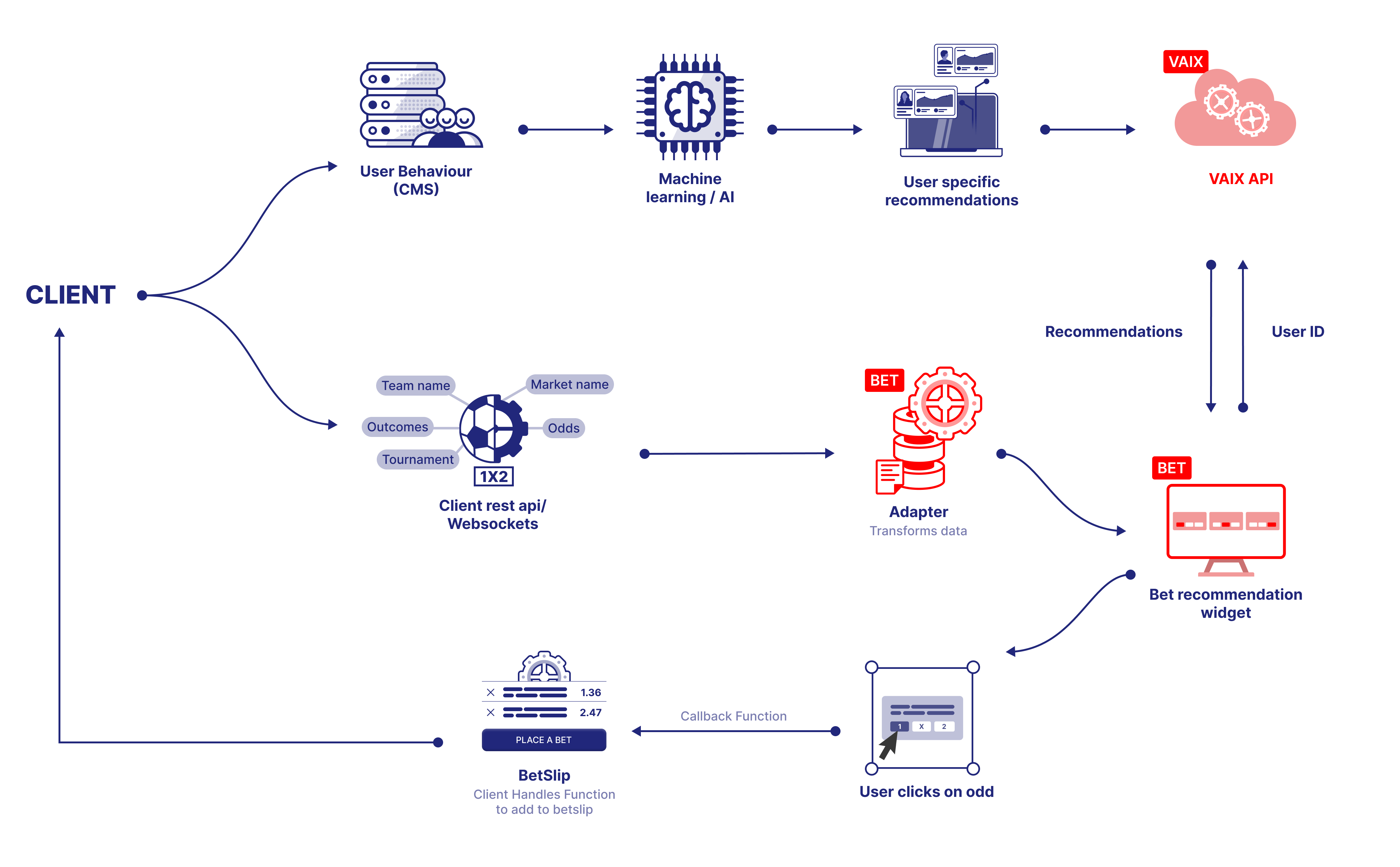
An adapter is a software component developed by the Sportradar engineering team that bridges the Bet Recommendation widgets and your platform's API. It retrieves data from your API and feeds it to the widget, ensuring seamless communication between the two systems.
Before adapter development begins, confirm and align your API contract with the Sportradar engineering team. Integration requires two SIR calls:
Expanded Table
| SIR method | Purpose |
|---|---|
SIR('registerAdapter', ...) | Configure the adapter that retrieves and displays data from your API. |
SIR('addWidget', ...) | Mount the widget on the page. |
(function (a, b, c, d, e, f, g, h, i) {
  a[e] ||
    ((i = a[e] =
      function () {
        (a[e].q = a[e].q || []).push(arguments);
      }),
    (i.l = 1 * new Date()),
    (i.o = f),
    (g = b.createElement(c)),
    (h = b.getElementsByTagName(c)[0]),
    (g.async = 1),
    (g.src = d),
    g.setAttribute("n", e),
    h.parentNode.insertBefore(g, h));
})(
  window,
  document,
  "script",
  "https://widgets.sir.sportradar.com/sportradar/widgetloader",
  "SIR",
  { language: "en" },
);

SIR("registerAdapter", "{ADAPTER_NAME}");
SIR("addWidget", "#sr-widget", "betRecommendation.markets");#Data Types
The following data types are provided by the adapter and are also available in the onItemClick callback payload.
Event
Expanded Table
| Property | Type | Required | Description |
|---|---|---|---|
id | string | number | Yes | Sportradar event ID. |
externalId | string | number | — | Client-side event ID. |
date | string | Yes | Formatted date string displayed in the widget. |
sport.id | string | number | Yes | Sport ID. Use sportsMapping if not using Sportradar sport IDs. |
sport.name | string | Yes | Sport name. |
category.id | string | number | — | Category ID. |
category.name | string | Yes | Category name (e.g. "England"). |
tournament.id | string | number | — | Tournament/league ID. |
tournament.name | string | Yes | Tournament name. |
teams | Array<{id, name}> | Yes | Home and away competitors. |
isLive | boolean | Yes | Whether the event is currently live. |
liveCurrentTime | string | Yes | Live time display (e.g. "2nd set", "45'"). |
result1 / result2 / result3 | result | — | Score columns: { result: [homeScore, awayScore] }. |
Market
Expanded Table
| Property | Type | Required | Description |
|---|---|---|---|
id | string | number | Yes | Market ID. |
name | string | — | Market name (e.g. "Match Winner"). |
status.isActive | boolean | — | When false, see Widget Behavior. |
Outcome
Expanded Table
| Property | Type | Required | Description |
|---|---|---|---|
id | string | number | Yes | Outcome ID. |
name | string | Yes | Outcome name (e.g. "Home", "Draw"). |
odds | string | number | Yes | Odds value. Use a number type to enable odds-change indicators (up/down arrows). |
specifier.value | string | number | — | Additional specifier (e.g. handicap value "-2.50"). |
status.isActive | boolean | — | When false, see Widget Behavior. |
#Tips
- When
maxAllowedOddsis exceeded, the widget trims legs starting from the highest-odds one and recalculates; this repeats until combined odds fall below the limit or the card drops belowminTicketLength, in which case the card is discarded. - Setting a high
minRequiredLegOddscombined with a lowmaxTicketLengthcan result in no cards being returned. Usedebug: trueto inspect how thresholds are filtering combos. - With
editLegAction: "replace", the replacement leg is constrained to the same sport, a similar odds range, and compatibility with the remaining legs.