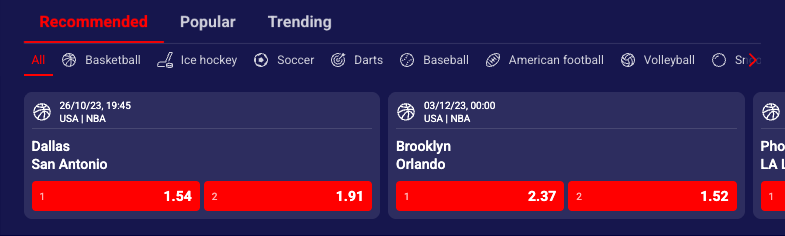
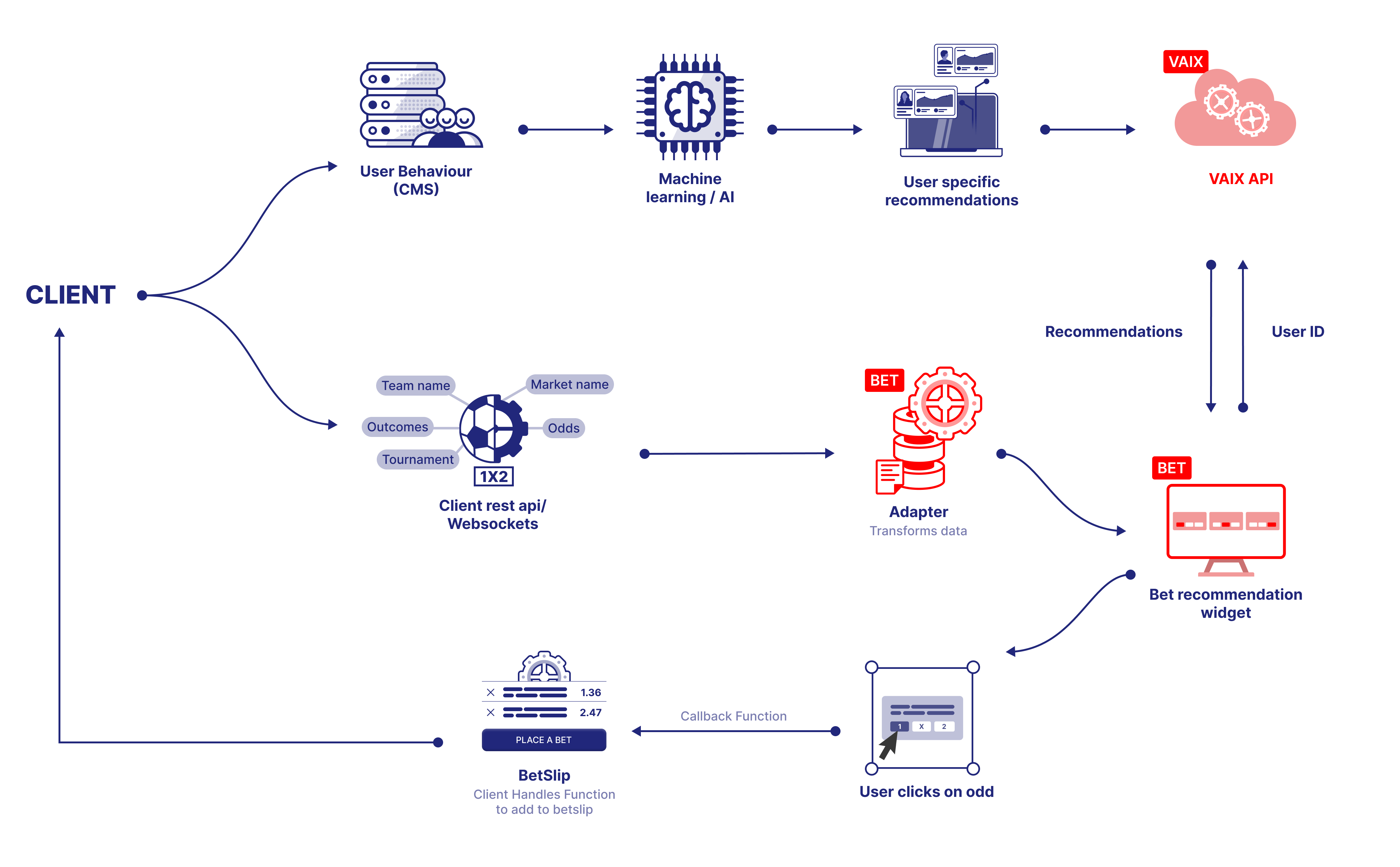
Highlights widget (Bet Recommendation) is a front-end widget that provides a personalized betting experience. It displays a list of events based on event popularity and the punters betting history via a user friendly interface. It simplifies the process of finding the right bet from the myriad of possible choices and boosts betting volume for upcoming and live events.
Punters past activity
General betting trends
Overall betting volume
Seasonal variations
New discovery and engagement patterns
Recommendation types
Recommended: Personalized list of recommendations based on punters betting history and preferences. Requires the user to be logged in.
Popular: List of the most popular items based on the total number of bets placed (no login required).
Trending: List of the currently trending items based on the number of recently placed bets (no login required).
info
Personalization requirement
To enable personalized recommendations (the recommended type), you must provide a unique user identifier. When no user ID is provided, the widget will fall back to popular recommendations.
Theming customization allows to tailor the appearance of Bet Recommendation widgets to meet specific needs and preferences. In the context of the Bet Recommendation widget, customization refers to the ability to modify the default styling of the widget by applying custom CSS properties to the various HTML elements that make up the widget.
Widget comes with pre-existing styling but can be customized by applying custom CSS properties to its different HTML elements. The widget's custom class selectors and supported CSS properties are listed below.
All custom classes must be nested within the .sr-bb.sr-betRecommendation selector class. This ensures that the custom styles only apply to that widget and not to other elements on the page.
Mandatory Configuration
The filters property is required for this widget to function correctly. It defines the recommendation logic and basic data constraints.
The onItemClick callback is fired whenever the user interacts with the widget. The first argument is a target string that identifies the interaction type; the second argument is a data object containing contextual information.
Expanded Table
Note: Widgets support callbacks on outcome clicks — the onItemClick handler receives target === "outcome" and a data object containing externalEvent, externalMarket and externalOutcome. Use this for custom outcome callbacks (e.g., add-to-betslip, analytics, modals).
The widget also exposes onTrack for event tracking analytics. See the tracking guide for details.
To keep the widget's selected-outcome state in sync with your own bet slip (i.e. show outcomes as selected when they were added outside the widget), use registerOnBetSlipChange inside registerAdapter.
javascript
// 1. Track your bet slip statelet changeCallback;let betSlipState = { betslip: [], combinedOddsValue: undefined };// 2. Notify the widget whenever the bet slip changesfunction onBetSlipChanged
An adapter is a software component developed by the Sportradar engineering team that bridges the Bet Recommendation widgets and your platform's API. It retrieves data from your API and feeds it to the widget, ensuring seamless communication between the two systems.
Before adapter development begins, confirm and align your API contract with the Sportradar engineering team. Integration requires two SIR calls:
Expanded Table
SIR method
Purpose
SIR('registerAdapter', ...)
Configure the adapter that retrieves and displays data from your API.
With cardsLayout: "horizontal", visible cards = cards per row × maxRows. Cards per row varies by container width: 1 (< 400px), 2 (400–660px), 3 (660–970px), 4 (970px+).
Property
Type
Default
Description
user
string|number
0
User identifier for personalized recommendations.
count
number
24
Number of event cards to display (1-48).
cardsLayout
string
"horizontal"
Layout direction: "horizontal" (grid) or "vertical" (single column).
categoryLayout
string
"tabs"
Display mode: "tabs" (one category at a time) or "expanded" (all categories).
cardVariant
string
"default"
Card style: "default", "compact", or "table".
outcomeNamePosition
string
"start"
Position of outcome label: "start", "end", "top", or "bottom".
onItemClick
function
undefined
Callback for user clicks on events or outcomes.
Property
Type
Default
Description
filters
object
Required
Configuration for all filter types including recommendation type, sports, time, country, and leagues. See below for detailed structure.
maxRows
number
1
Maximum number of card rows to display. Determines vertical height of widget. Combined with responsive cards-per-row calculation, this controls total visible cards. Example: 3 rows × 4 cards/row = 12 visible cards. Range: 1-3 rows.
sportsMapping
object
undefined
Maps client's sport identifiers to Sportradar sport IDs. Object with keys as client sport IDs (string/number) and values as Sportradar sport IDs. Example: {101: 1, 102: 2} maps client sport 101 to soccer, 102 to basketball. Allows using client's sport taxonomy in filter configurations.
similarEventIds
array<number>
undefined
Array of event IDs for "similar" recommendation type. Required when filters.recommendationType.available includes "similar" and active: "similar". AI finds events similar to specified reference events based on sport, league, teams, odds patterns, and market characteristics. Example: [12345, 67890] finds events similar to these two matches.
debug
boolean
false
Enables debug mode with console logging for development. When true, logs recommendation generation, API calls, event filtering, card rendering, interaction tracking, errors with stack traces. Use for troubleshooting integration issues and understanding recommendation logic.
styling
object
undefined
Custom styling configuration for layout adjustments.
styling.disablePaddingTop
boolean
false
Removes top padding from widget container. Use when widget follows other content without spacing gap.
styling.disablePaddingBottom
boolean
false
Removes bottom padding from widget container. Use when widget precedes other content without spacing gap.
Filters Object
The filters object controls recommendation algorithms, time windows, sports, geographic regions, and league filtering.
Expanded Table
Property
Type
Default
Description
recommendationType
object
Required
Recommendation algorithm configuration controlling which recommendation types display and initial active type.
recommendationType.available
array<string>
["recommended", "popular", "trending", "similar"]
Required. Array of recommendation types to enable. Order determines tab sequence (when categoryLayout: "tabs") or section order (when categoryLayout: "expanded"). Options:
"recommended": AI-powered personalized recommendations based on user betting history (requires user parameter). Analyzes user's favorite sports, preferred odds ranges, typical bet types, bet timing, win rates, and engagement patterns.
"popular": Most popular events across all users. Shows events with highest betting volume, number of unique bettors, and consistent popularity. Social proof effect.
"trending": Events experiencing momentum and increasing popularity. Captures betting volume spikes, rapid odds changes, unusual activity patterns, social media buzz. Time-sensitive opportunities.
"similar": Events similar to specified reference events (requires similarEventIds parameter). AI finds comparable matches based on sport, league, teams, odds, market characteristics, timing.
recommendationType.active
string
First value from available
Initially active/selected recommendation type. Must be one value from available array. When categoryLayout: "tabs", determines which tab displays first. When categoryLayout: "expanded", determines initial scroll position/emphasis. Example: "popular" starts with popular recommendations visible.
recommendationType.hidden
boolean
false
Controls visibility of recommendation type selector. When true, hides category tabs/headers entirely (widget shows events from active type only, no switching UI). When false, shows navigation between recommendation types. Set true for single-type focused displays, clean minimal layouts.
sport
object
undefined
Sport filter configuration.
sport.available
array<string|number>
[]
Array of Sportradar sport IDs to include in recommendations and sport filter. Empty array or omitted shows all available sports. Example: [1, 2, 5] for soccer, basketball, tennis only. When provided, widget shows sport filter UI with these options. See Sports Reference.
sport.hidden
boolean
false
Controls visibility of sport filter UI. When true, hides sport selector (events still filtered by sport.available if specified, but no user-facing filter controls). When false, shows sport filter icons/tabs for user selection. Set true for single-sport pages, clean minimal interfaces.
sport.sportNames
boolean
false
Display mode for sport filter. When true, shows sport names as text labels instead of sport icons. When false, shows sport-specific icons (⚽ soccer, 🏀 basketball, etc.). Set true for accessibility, text-heavy designs, or when icons unclear to users.
time
object
undefined
Time/status filter configuration for event scheduling.
time.available
array<string>
["live", "not_started"]
Array of available time filter options. Options: "live" (only live/in-play events), "not_started" (only upcoming/pre-match events). Example: ["live"] shows live-only filter, ["not_started"] shows upcoming-only, ["live", "not_started"] shows both with toggle.
time.active
array<string>
All values from available
Initially active time filters. Can select multiple values from available array for combined filtering. Example: ["live"] starts showing live events only, ["live", "not_started"] shows both (no time filtering), [] shows nothing (edge case - avoid).
time.hidden
boolean
false
Controls visibility of time filter UI. When true, hides time selector (events still filtered by time.active, but no user controls). When false, shows time filter toggle/buttons. Set true for fixed time scope pages (e.g., "Live Betting Hub" always shows live).
country
object
undefined
Country/region filter configuration.
country.available
array<string|number>
undefined
Array of country identifiers to filter events geographically. Accepts Sportradar country IDs or ISO country codes (A2/A3). Example: ["US", "GB", "DE"] shows only events from USA, UK, Germany. When provided, only events from specified countries appear. See Getting Identifiers.
league
object
undefined
League/tournament filter configuration.
league.available
array<string|number>
undefined
Array of tournament/league identifiers to filter events by competition. Accepts Sportradar unique tournament IDs. Example: ["sr:tournament:17", "sr:tournament:34"] shows only Premier League and Bundesliga events. Powerful for league-specific pages or premium competition focus. See Getting Identifiers.
Filters Example
javascript
{ recommendationType: { available: ['recommended', 'popular', 'trending'], active: 'popular', hidden: false }, sport: { available: [1, 2, 5], // Soccer, Basketball, Tennis hidden: false, sportNames: false }, time: { available: ['live', 'not_started'], active: ['live', 'not_started'] // Show both }, country: { available: ['GB', 'DE', 'ES', 'IT'] // Top European countries }, league: { available: [ 'sr:tournament:17', // Premier League 'sr:tournament:34', // Bundesliga 'sr:tournament:7' // La Liga ] }}
CSS class
Supported CSS properties
srct-br-container
background-color, font-family
srct-br-header
background-color, color
srct-br-header__divider
border-color
srct-br-footer
color
srct-br-loading
background-color, border-radius
srct-br-navigation
background-color, color
srct-br-sportsfilter
background-color, color
srct-br-content
background-color
srct-br-content__title
color
srct-br-cardlist
background-color, border-radius
srct-br-card
background-color, color, border-radius
srct-br-card__divider
border-color
srct-br-outcome
background-color, color, border-radius
srct-br-outcome--selected
background-color, color, border-radius
srct-br-outcome--disabled
background-color, color, border-radius
srct-br-outcome__name
font-size, color
srct-br-outcome__value
font-size, color
srct-br-eventinfo
font-size, color
srct-br-eventinfo__info
font-size
srct-br-eventinfo__icon
color
srct-br-eventinfo__time
font-size, color
srct-br-eventinfo__status
font-size, color
srct-br-eventinfo__name
font-size, color
srct-br-scoreboard
font-size, color
srct-br-scoreboard__teams
font-size, color
srct-br-scoreboard__scores
font-size, color
srct-br-scoreboard__score-1
font-size, color
srct-br-scoreboard__score-2
font-size, color
srct-br-scoreboard__score-3
font-size, color
Basic horizontal grid with popular and trending recommendations.