#Adapter Object
Expanded Table
| Property | Type | Required | Description |
|---|---|---|---|
| config | ConfigObject | Adapter configuration settings | |
| endpoints | EndpointsObject | yes | Adapter endpoint implementations |
#Config Object
The config object controls adapter behavior and widget-specific configurations.
Expanded Table
| Property | Type | Required | Description |
|---|---|---|---|
| widget | WidgetConfig | Widget-specific configurations |
#WidgetConfig
Expanded Table
| Property | Type | Required | Description |
|---|---|---|---|
'betRecommendation.eventList' | BrEventListConfig | Configuration for bet recommendation event list widget |
#Endpoints Object
The endpoints object contains all adapter endpoint implementations.
Expanded Table
// Example adapter implementation
const adapter = {
  config: {
    widget: {
      'betRecommendation.eventList': {
        layout: { /* EventListMarketsConfig */ },
        allowedMarkets: { /* SportMarketsMap */ }
      }
    }
  },
  endpoints: {
    event:
#Widget Specific Endpoints
In all widgets below, where eventMarkets, market and availableMarketsForEvent endpoints are listed as mandatory, either eventMarkets endpoint needs to be implemented, or both market and availableMarketsForEvent, not all three.
It depends on the nature of your data, which option is more convenient to implement. If your API endpoint returns a single market object, it is more convenient to implement the market and availableMarketsForEvent combination, if your API returns a list of markets, it is more convenient to implement the eventMarkets endpoint.
#betRecommendation.highlights
#Mandatory Endpoints
eventMarketsor (market+availableMarketsForEvent)event
#Optional Endpoints
filterMarkets- narrows markets selection for widget specific usebetSlipSelection- visual representation of markets already in betslipcashBackSelections- adds visual representation of cash back markets
#betRecommendation.eventList
#Mandatory Endpoints
eventMarketsor (market+availableMarketsForEvent)event
#Optional Endpoints
filterMarkets- narrows markets selection for widget specific usebetSlipSelection- visual representation of markets already in betslipcashBackSelections- adds visual representation of cash back markets
#betRecommendation.swipeBet
#Mandatory Endpoints
eventMarketsor (market+availableMarketsForEvent)event
#Optional Endpoints
filterMarkets- narrows markets selection for widget specific usebetSlipSelection- visual representation of markets already in betslipcashBackSelections- adds visual representation of cash back markets
#betRecommendation.similarBets
#Mandatory Endpoints
eventMarketsor (market+availableMarketsForEvent)event
#Optional Endpoints
filterMarkets- narrows markets selection for widget specific usebetSlipSelection- visual representation of markets already in betslipcashBackSelections- adds visual representation of cash back markets
#betRecommendation.markets
#Mandatory Endpoints
eventMarketsor (market+availableMarketsForEvent)event
#Optional Endpoints
betSlipSelection- visual representation of markets already in betslip
#betRecommendation.myCombo
#Mandatory Endpoints
eventMarketsor (market+availableMarketsForEvent)event
#Optional Endpoints
betSlipSelection- visual representation of markets already in betslip
#betInsights
#Mandatory Endpoints
eventMarketsor (market+availableMarketsForEvent)event
#Optional Endpoints
betSlipSelection- visual representation of markets already in betslip
#betConcierge
#Mandatory Endpoints
availableMarketsForEvent- the AI assistant suggests bets from one of these markets based on conversation contexteventMarketsormarket- implement one (mutually exclusive); provides full market info for the AI-suggested marketbetSlipSelection- marks outcomes already in the user's bet slip as selected
#Optional Endpoints
recommendedSelections- marks a selection as recommended (use for promotions)calculateCustomBetXML- enables custom bet combo suggestions (requiresenableCustomBet: truewidget prop)
#virtualStadium
#Optional Endpoints
tickets- enables bet sharingmatchEventSuggestedSelection- to enable flash beteventMarketsor (market+availableMarketsForEvent) - to enable flash bet
betInsights is an optional component of Virtual Stadium. If betInsights is enabled, all adapter endpoints required by betInsights must be implemented as well.
#Complete Adapter Example
This is an example of an adapter implementing all endpoints. It is intended to be a copy/paste template, where only data fetching and transformation need to be implemented. When implementing an adapter, implement only the endpoints which are required by the widget being integrated, and discard the rest. For each endpoint, only the getData${ENDPOINT_NAME}() and transormData${ENDPOINT_NAME}() functions need to be implemented.
Expand Adapter Template Code
#Adapter Endpoints
#Market Function
Retrieves data for a specific market of a specific event.
Names such as market names, outcome names, and other text content should be provided in the language specified by args.language to ensure proper localization for users.
The oddsType parameter specifies the current format of odds set for the widget. If you provide odds in a different format, consider updating the odds type in the widget loader configuration. See the Global SIR API documentation for details on configuring odds formats.
Used by: betRecommendation.highlights, betRecommendation.eventList, betRecommendation.swipeBet, betRecommendation.similarBets, betRecommendation.markets, betRecommendation.myCombo, betInsights, betConcierge
Expanded Table
| Argument | Type | Required | Description |
|---|---|---|---|
| args | MarketRequest | yes | Request parameters including market/outcome selection, language, and odds type |
| callback | Callback<MarketResponse> | yes | Function to receive market data or error |
Returns: UnsubscribeFunction - Optional cleanup function to stop receiving updates
// Example implementation
adapter.endpoints.market = (args, callback) => {
  // args example:
  // {
  //   selection: { event: "sr:match:123", market: "18", specifiers: "total=2.5", type: 'uf' },
  //   language: "en",
  //   oddsType: "decimal"
  // }

  // Your implementation here - fetch specific market data based on args
#EventMarkets Function
Retrieves data for all markets of a specific event.
Names such as market names, outcome names, and other text content should be provided in the language specified by args.language to ensure proper localization for users.
The oddsType parameter specifies the current format of odds set for the widget. If you provide odds in a different format, consider updating the odds type in the widget loader configuration. See the Global SIR API documentation for details on configuring odds formats.
Used by: betRecommendation.highlights, betRecommendation.eventList, betRecommendation.swipeBet, betRecommendation.similarBets, betRecommendation.markets, betRecommendation.myCombo, betInsights, betConcierge
Expanded Table
| Argument | Type | Required | Description |
|---|---|---|---|
| args | EventMarketsRequest | yes | Request parameters including event selection, language, and odds type |
| callback | Callback<EventMarketsResponse> | yes | Function to receive markets data or error |
Returns: UnsubscribeFunction - Optional cleanup function to stop receiving updates
// Example implementation
adapter.endpoints.eventMarkets = (args, callback) => {
  // args example:
  // {
  //   selection: { event: "sr:match:12345", type: "uf" },
  //   language: "en",
  //   oddsType: "decimal"
  // }

  // Your implementation here - fetch markets data based on args
#Event Function
Retrieves detailed event data including event start time, scores, team names, tournament name, and more.
Names such as team names, tournament names, and other text content should be provided in the language specified by args.language. Event times should be converted and displayed in the timezone specified by args.displayedTimezone to ensure proper localization for users.
Used by: betRecommendation.highlights, betRecommendation.eventList, betRecommendation.swipeBet, betRecommendation.similarBets, betRecommendation.markets, betRecommendation.myCombo, betInsights, betConcierge
Expanded Table
| Argument | Type | Required | Description |
|---|---|---|---|
| args | EventRequest | yes | Request parameters including event selection and display preferences |
| callback | Callback<EventResponse>> | yes | Function to receive event data or error |
Returns: UnsubscribeFunction - Optional cleanup function to stop receiving updates
// Example implementation
adapter.endpoints.event = (args, callback) => {
  // args example:
  // {
  //   selection: { event: "sr:match:12345", type: "uf" },
  //   language: "en",
  //   displayedTimezone: "Europe:Berlin"
  // }

  // Your implementation here - fetch event data based on args
  // Then call callback with the result
  callback(undefined,
#AvailableMarketsForEvent Function
Retrieves all available market offering in Selection format for a requested event. Only called when implementing the market endpoint (not used with eventMarkets).
Used by: betRecommendation.highlights, betRecommendation.eventList, betRecommendation.swipeBet, betRecommendation.similarBets, betRecommendation.markets, betRecommendation.myCombo, betInsights, betConcierge
Expanded Table
| Argument | Type | Required | Description |
|---|---|---|---|
| args | AvailableMarketsForEventRequest | yes | Request parameters including event selection |
| callback | Callback<AvailableMarketsForEventResponse> | yes | Function to receive available markets or error |
Returns: UnsubscribeFunction - Optional cleanup function to stop receiving updates
// Example implementation
adapter.endpoints.availableMarketsForEvent = (args, callback) => {
  // args example:
  // {
  //   selection: { event: "sr:match:12345", type: "uf" }
  // }

  // Your implementation here - fetch available markets for the event
  // Then call callback with the result
  callback(undefined, {
    selection
#FilterMarkets Function
This endpoint is called to perform additional filtering based on widget-specific requirements or other parameters. The widget property in the request arguments identifies which widget is requesting the filtering, allowing you to customize market filtering logic per widget. If no filtering is required, you can simply return the input selections unchanged. Example: For Swipe Bet you only want to use market 1x2 out of all available.
Used by: betRecommendation.highlights, betRecommendation.eventList, betRecommendation.swipeBet, betRecommendation.similarBets
The widget argument value passed by each widget:
betRecommendation.highlightsandbetRecommendation.similarBets→"betRecommendation"betRecommendation.eventList→"betRecommendation.eventList"betRecommendation.swipeBet→"betRecommendation.swipeBet"
Expanded Table
| Argument | Type | Required | Description |
|---|---|---|---|
| args | FilterMarketsRequest | yes | Request parameters including widget name and optional event selections |
| callback | Callback<FilterMarketsResponse> | yes | Function to receive filtered markets or error |
Returns: UnsubscribeFunction - Optional cleanup function to stop receiving updates
// Example implementation
adapter.endpoints.filterMarkets = (args, callback) => {
  // args example:
  // {
  //   widget: "swipeBet",
  //   selection: [
  //     { event: "sr:match:12345", type: "uf", market: "1" },
  //     { event: "sr:match:12345", type: "uf", market: "18", specifiers: "total=2.5" }
  //   ]
  // }
#BetSlipSelection Function
Subscribes to the current bettor's bet slip selections (their betting cart). Widgets use this data to display selections as selected or, depending on the widget, may hide certain selections.
Used by: betRecommendation.highlights, betRecommendation.eventList, betRecommendation.swipeBet, betRecommendation.similarBets, betRecommendation.markets, betRecommendation.myCombo, betInsights, betConcierge
Expanded Table
| Argument | Type | Required | Description |
|---|---|---|---|
| args | undefined | No arguments | |
| callback | Callback<BetSlipSelectionResponse> | yes | Function to receive bet slip selections or error |
Returns: UnsubscribeFunction - Optional cleanup function to stop receiving updates
// Example implementation
adapter.endpoints.betSlipSelection = (args, callback) => {
  // args is undefined for this endpoint

  // Your implementation here - subscribe to bet slip changes
  // Call callback whenever bet slip changes
  callback(undefined, {
    selection: [
      { event: "sr:match:12345", market: "1"
#CashBackSelections Function
Retrieves selections eligible for cash back promotions.
Used by: betRecommendation.highlights, betRecommendation.eventList, betRecommendation.swipeBet, betRecommendation.similarBets
Expanded Table
| Argument | Type | Required | Description |
|---|---|---|---|
| args | CashBackSelectionsRequest | yes | Request parameters including widget name and event selections |
| callback | Callback<CashBackSelectionsResponse> | yes | Function to receive cash back selections or error |
Returns: UnsubscribeFunction - Optional cleanup function to stop receiving updates
// Example implementation
adapter.endpoints.cashBackSelections = (args, callback) => {
  // args example:
  // {
  //   widget: "cashBack",
  //   selection: [
  //     { event: "sr:match:12345", type: "uf" },
  //     { event: "sr:match:67890", type: "uf" }
  //   ]
  // }

  // Your implementation here - fetch cash back eligible events
  // Then call callback with the result
#Tickets Function
Retrieves the bettor's placed bets (tickets).
The callback receives a TicketsResponse: prefer TicketResponseV2. Deprecated BetShareResponse remains supported for legacy Virtual Stadium integrations.
Used by: virtualStadium
Expanded Table
| Argument | Type | Required | Description |
|---|---|---|---|
| args | TicketsRequest | yes | Request parameters including operator ID, customer ID, and optional filters |
| callback | Callback<TicketsResponse> | yes | Function to receive tickets or error |
Returns: UnsubscribeFunction - Optional cleanup function to stop receiving updates
// Example implementation (TicketResponseV2)
adapter.endpoints.tickets = (args, callback) => {
  // args example:
  // {
  //   operatorId: "operator123",
  //   endCustomerId: "customer456",
  //   events: [
  //     { event: "sr:match:12345", type: "uf" }
  //   ],
  //   channelId: "web",
  //   page: 1
  // }

  // Your implementation here - fetch user tickets based on args
#MatchEventSuggestedSelection Function
Retrieves suggested selections for a specific match event (incident).
Used by: virtualStadium
Expanded Table
| Argument | Type | Required | Description |
|---|---|---|---|
| args | MatchEventSuggestedSelectionRequest | yes | Request parameters including match event, event selection, and optional suggestion hint |
| callback | Callback<MatchEventSuggestedSelectionResponse> | yes | Function to receive suggested selections or error |
Returns: UnsubscribeFunction - Optional cleanup function to stop receiving updates
// Example implementation
adapter.endpoints.matchEventSuggestedSelection = (args, callback) => {
  // args example:
  // {
  //   matchEvent: { type: "GOAL", metadata: { goal_number: "2" } },
  //   event: { event: "sr:match:12345", type: "uf" },
  //   widget: "liveMatchTracker",
  //   suggestion: {
  //     type: "Outcome",
  //     selections: [
#RecommendedSelections Function
Retrieves recommended selections for a given event.
Used by: betConcierge
Expanded Table
| Argument | Type | Required | Description |
|---|---|---|---|
| args | RecommendedSelectionsRequest | yes | Request parameters including event selections |
| callback | Callback<RecommendedSelectionsResponse> | yes | Function to receive recommended selections or error |
Returns: UnsubscribeFunction - Optional cleanup function to stop receiving updates
// Example implementation
adapter.endpoints.recommendedSelections = (args, callback) => {
  // args example:
  // {
  //   events: [
  //     { event: "sr:match:12345", type: "uf" }
  //   ]
  // }

  // Your implementation here - fetch recommended selections for the given events
  // Then call callback with the result
  callback(undefined, {
#CalculateCustomBetXML Function
Calculates custom bet XML for given markets and match.
Used by: betConcierge
Expanded Table
| Argument | Type | Required | Description |
|---|---|---|---|
| args | CalculateCustomBetXmlRequest | yes | Request parameters containing the calculate payload |
| callback | Callback<CalculateCustomBetXmlResponse> | yes | Function to receive the resulting payload or error |
Returns: UnsubscribeFunction - Optional cleanup function to stop receiving updates
// Example implementation
adapter.endpoints.calculateCustomBetXML = (args, callback) => {
  // args example:
  // {
  //   calculatePayload: "<filterSelections>...</filterSelections>"
  // }

  // Your implementation here - calculate custom bet XML and return result
  // Then call callback with the result
  callback(undefined, {
    payload: "<filtered_calculation_response>...</filtered_calculation_response>"
#Utility Types
#Callback<T>
Error-first callback function pattern used by all adapter endpoints.
Expanded Table
| Property | Type | Required | Description |
|---|---|---|---|
| error | Error | undefined | yes | Error object if the operation failed, or undefined if successful |
| data | T | undefined | Response data if successful, or undefined if an error occurred |
Type Parameters:
T- The type of data returned on success
// Type-specific example with BetSlipSelectionResponse
betSlipSelection(args, callback) {
  // other code

  if (error) {
    // something went wrong, return error
    callback(error)
    return;
  }
  // Operation successful, return BetSlipSelectionResponse
  callback(undefined, { selection: { event: "sr:match:12345", market: "18", outcome
#UnsubscribeFunction
Optional cleanup function returned by adapter endpoints to stop receiving updates.
Type: (() => void) | undefined
When an adapter endpoint returns an UnsubscribeFunction, you can call it to stop receiving further callback invocations. This is useful for:
- Cleaning up subscriptions when a component unmounts
- Stopping live data updates when they are no longer needed
- Managing memory and preventing memory leaks
endpoint(args, callback) {
  // code
  return () => {
    // Implement unsubscribe logic, e.g., remove event listener, cancel subscription
    subscription.unsubscribe();
  }
}
See Also: Callback<T>
#Request Types
#EventRequest
Request parameters for fetching event data.
Expanded Table
| Property | Type | Required | Description |
|---|---|---|---|
| selection | SelectionEvent | yes | Event identifier in UF or external format |
| language | string | Language code for localized content (e.g., "en", "de") | |
| displayedTimezone | string | Timezone for displaying event times (e.g., "Europe:Berlin", "Europe/London") |
// Example usage
const eventRequest = {
  selection: { event: "sr:match:12345", type: "uf" },
  language: "en",
  displayedTimezone: "Europe:Berlin"
};

// With minimal properties
const minimalRequest = {
  selection: { event: "sr:match:67890", type: "uf" }
};#EventMarketsRequest
Request parameters for fetching all markets data for a specific event.
Expanded Table
| Property | Type | Required | Description |
|---|---|---|---|
| selection | SelectionEvent | yes | Event identifier in UF or external format |
| language | string | Language code for localized content (e.g., "en", "de") | |
| oddsType | string | Type of odds to display. Valid values: 'decimal', 'fractional', 'moneyline', 'hong-kong', 'indonesian', 'malay' |
// Example usage
const eventMarketsRequest = {
  selection: { event: "sr:match:12345", type: "uf" },
  language: "en",
  oddsType: "decimal"
};

// With minimal properties
const minimalRequest = {
  selection: { event: "sr:match:67890", type: "uf" }
};#MarketRequest
Request parameters for fetching a specific market data for an event.
Expanded Table
| Property | Type | Required | Description |
|---|---|---|---|
| selection | SelectionMarket | SelectionOutcome | yes | Market or outcome identifier to fetch |
| language | string | yes | Language code for localized content (e.g., "en", "de") |
| oddsType | string | yes | Type of odds to display. Valid values: 'decimal', 'fractional', 'moneyline', 'hong-kong', 'indonesian', 'malay' |
// Example usage with market selection
const marketRequest = {
  selection: { event: "sr:match:12345", market: "1", type: "uf" },
  language: "en",
  oddsType: "decimal"
};

// Example with outcome selection
const outcomeRequest = {
  selection: { event: "sr:match:12345",
#AvailableMarketsForEventRequest
Request parameters for fetching all available markets for a specific event.
Expanded Table
| Property | Type | Required | Description |
|---|---|---|---|
| selection | SelectionEvent | yes | Event identifier in UF or external format |
// Example usage
const availableMarketsRequest = {
  selection: { event: "sr:match:12345", type: "uf" }
};#FilterMarketsRequest
Request parameters for filtering markets based on widget configuration.
Expanded Table
| Property | Type | Required | Description |
|---|---|---|---|
| widget | string | yes | Widget identifier to determine which markets to filter (e.g., "swipeBet", "betRecommendation") |
| selection | SelectionMarket[] | Optional array of market identifiers to filter markets |
// Example usage with events
const filterMarketsRequest = {
  widget: "swipeBet",
  selection: [
    { event: "sr:match:12345", type: "uf", market: "1" },
    { event: "sr:match:67890", type: "uf", market: "18", specifiers: "total=2.5" }
  ]
};
#TicketsRequest
Request parameters for fetching tickets.
Expanded Table
// Example usage with all properties
const ticketsRequest = {
  operatorId: "operator123",
  endCustomerId: "customer456",
  events: [
    { event: "sr:match:12345", type: "uf" }
  ],
  channelId: "euro-league",
  page: 1
};

// Example with minimal properties
const minimalRequest
#MatchEventSuggestedSelectionRequest
Request parameters for fetching suggested selections for a specific match event (incident).
Expanded Table
#type and suggestedSelections
The type field is an optional instruction indicating which selection form the client expects. When provided, the adapter is expected to return selections matching that form:
'outcome': response should contain outcome-level selections (SelectionOutcome[]).'market': response should contain market-level selections (SelectionMarket[]).
The suggestedSelections property carries the actual suggested selections and should match the type when both are provided.
// Example usage preferring outcome-level selections
const requestWithOutcomeSuggestion = {
  matchEvent: { type: "GOAL", metadata: { goal_number: "2" } },
  event: { event: "sr:match:12345", type: "uf" },
  widget
#RecommendedSelectionsRequest
Request parameters for fetching recommended selections for given events.
Expanded Table
| Property | Type | Required | Description |
|---|---|---|---|
| events | SelectionEvent[] | yes | Array of event identifiers for which to retrieve recommended selections |
// Example usage
const recommendedSelectionsRequest = {
  events: [
    { event: "sr:match:12345", type: "uf" },
    { event: "sr:match:67890", type: "uf" }
  ]
};#CalculateCustomBetXmlRequest
Request parameters for calculating custom bet XML.
Expanded Table
| Property | Type | Required | Description |
|---|---|---|---|
| calculatePayload | string | yes | XML payload string used as input for the custom bet calculation |
// Example usage
const calculateCustomBetXmlRequest = {
  calculatePayload: `<filterSelections
                        xmlns="http://schemas.sportradar.com/custombet/v1/endpoints"
                        xmlns:xsi="http://www.w3.org/2001/XMLSchema-instance"
                        xsi:schemaLocation="http://schemas.sportradar.com/custombet/v1/endpoints
                        http://schemas.sportradar.com/custombet/v1/endpoints/Selections.xsd">
                        <selection id="sr:match:50955897">
                            <market market_id="1" outcome_id="3"/>
                        </selection>
                    </filterSelections>`
};#Response Types
#EventResponse
Response data containing event information.
Expanded Table
| Property | Type | Required | Description |
|---|---|---|---|
| event | Event | yes | Complete event data including details, status, participants, and metadata |
// Example response structure
const eventResponse = {
  event: {
    id: "sr:match:12345",
    sport: { id: "1", name: "Soccer" },
    category: { id: "1", name: "England" },
    tournament: { id: "17", name: "Premier League"
#EventMarketsResponse
Response data containing all markets for an event.
Expanded Table
| Property | Type | Required | Description |
|---|---|---|---|
| markets | Market[] | yes | Array of market data for the event |
| event | string | yes | Event identifier string (e.g., "sr:match:12345") |
// Example response structure
const eventMarketsResponse = {
  markets: [
     {
      id: "18",
      name: "Total Goals",
      specifiers: "total=2.5",
      outcomes: [
        { id: "12", name: "Over 2.5", status: "active", odds: {
#MarketResponse
Response data containing a specific market and event information.
Expanded Table
| Property | Type | Required | Description |
|---|---|---|---|
| market | Market | yes | Market data including outcomes and odds |
| event | string | yes | Event identifier string (e.g., "sr:match:12345") |
// Example response structure
const marketResponse = {
  market: {
    id: "sr:market:1",
    name: "Match Winner",
    outcomes: [
      { id: "1", name: "Home", odds: 2.5 },
      { id: "X", name: "Draw", odds: 3.0 },
#AvailableMarketsForEventResponse
Response data containing all available market offering as selections for an event.
Expanded Table
| Property | Type | Required | Description |
|---|---|---|---|
| selection | SelectionMarket[] | yes | Array of market selection identifiers available for the event |
// Example response structure
const availableMarketsResponse = {
  selection: [
    { event: "sr:event:1", market: "1" },
    { event: "sr:event:1", market: "18", specifiers: "total=2.5" },
    { event: "sr:event:1", market: "10" }
  ]
};#FilterMarketsResponse
Response data containing filtered market selections based on the widget identifier and input selections.
Expanded Table
| Property | Type | Required | Description |
|---|---|---|---|
| selection | SelectionMarket[] | yes | Array of event or market selections that match the filter criteria |
// Example response structure
const filterMarketsResponse = {
  selection: [
    { event: "sr:match:12345", type: "uf", market: "1" },
    { event: "sr:match:12345", type: "uf", market: "18", specifiers: "total=2.5" }
  ]
};#BetSlipSelectionResponse
Response data containing currently selected outcomes in the bet slip.
Expanded Table
| Property | Type | Required | Description |
|---|---|---|---|
| selection | SelectionOutcome[] | yes | Array of outcome selections currently in the bet slip |
// Example response structure
const betSlipSelectionResponse = {
  selection: [
    { event: "sr:match:12345", market: "1", outcome: "2", odds: { type: "decimal", value: "1.95" } },
      { event: "sr:match:12345", market: "18", outcome: "1",
#CashBackSelectionsRequest
Request parameters for fetching cash back selections.
Expanded Table
| Property | Type | Required | Description |
|---|---|---|---|
| widget | string | yes | Widget identifier to determine the context of the cash back request |
| selection | SelectionEvent[] | yes | Array of event selections to check for cash back eligibility |
// Example usage
const cashBackSelectionsRequest = {
  widget: "cashBack",
  selection: [
    { event: "sr:match:12345", type: "uf" },
    { event: "sr:match:67890", type: "uf" }
  ]
};#CashBackSelectionsResponse
Response data containing events eligible for cash back.
Expanded Table
| Property | Type | Required | Description |
|---|---|---|---|
| events | SelectionEvent[] | yes | Array of event selections that are eligible for cash back promotions |
// Example response structure
const cashBackSelectionsResponse = {
  events: [
    { event: "sr:match:12345", type: "uf" },
    { event: "sr:match:67890", type: "uf" }
  ]
};#TicketsResponse
Union type for the tickets endpoint callback result. Return either TicketResponseV2 (recommended) or deprecated BetShareResponse. The shapes are mutually exclusive: provide tickets or bets, never both.
Expanded Table
| Shape | Discriminator | Description |
|---|---|---|
TicketResponseV2 | tickets present | Current ticket format based on the v2 ticket schema |
BetShareResponse | bets present | Deprecated. Legacy Virtual Stadium bet-share format |
See Also: Tickets Function, TicketResponseV2, BetShareResponse
#TicketResponseV2
Current response shape for the tickets endpoint. Contains an array of v2 Ticket objects.
Expanded Table
| Property | Type | Required | Description |
|---|---|---|---|
| tickets | Ticket[] | yes | Array of ticket objects containing bets, selections, stake, and related data |
| bets | — | no | Must not be present. Reserved so this shape cannot be mixed with BetShareResponse |
// Example response structure
const ticketResponseV2 = {
  tickets: [
    {
      ticketId: "ticket_123456",
      bets: [
        {
          betId: "bet_001",
          selections: [
See Also: Ticket, TicketsResponse, Tickets Function
#BetShareResponse (Deprecated)
Deprecated. Legacy Virtual Stadium bet-share response. New implementations should return TicketResponseV2 instead.
Expanded Table
| Property | Type | Required | Description |
|---|---|---|---|
| bets | BetSlip[] | yes | Array of deprecated bet-slip objects (one per shared ticket) |
| tickets | — | no | Must not be present. Reserved so this shape cannot be mixed with TicketResponseV2 |
// Example response structure (deprecated)
const betShareResponse = {
  bets: [
    {
      id: "ticket_123456",
      betSlipId: "654321",
      betType: "single",
      currency: "USD",
      combinedOdds: {
See Also: BetSlip (Deprecated), TicketsResponse, Tickets Function
#MatchEventSuggestedSelectionResponse
Response data containing suggested selections for the match event.
Expanded Table
| Property | Type | Required | Description |
|---|---|---|---|
| selections | (SelectionMarket | SelectionOutcome)[] | yes | Array of suggested market or outcome selections for the match event |
// Example response structure
const matchEventSuggestedSelectionResponse = {
  selections: [
    { event: "sr:match:12345", market: "1", outcome: "1", type: "uf" },
    { event: "sr:match:12345", market: "18", specifiers: "total=2.5", type: "uf" }
  ]
};#RecommendedSelectionsResponse
Response data containing recommended selections for the requested events.
Expanded Table
| Property | Type | Required | Description |
|---|---|---|---|
| selection | SelectionOutcome[] | yes | Array of recommended outcome selections |
// Example response structure
const recommendedSelectionsResponse = {
  selection: [
    { event: "sr:match:12345", market: "1", outcome: "1", type: "uf" },
    { event: "sr:match:67890", market: "18", specifiers: "total=2.5", outcome: "13", type: "uf" }
  ]
#CalculateCustomBetXmlResponse
Response data containing the calculated custom bet XML payload.
Expanded Table
| Property | Type | Required | Description |
|---|---|---|---|
| payload | string | yes | Resulting XML payload string from the custom bet calculation |
// Example response structure
const calculateCustomBetXmlResponse = {
  payload: `<filtered_calculation_response generated_at="2025-04-16T13:29:08+00:00">
              <calculation odds="21.50303106727931" probability="0.030418715351118873" harmonization="false"/>
              <available_selections>
                <event id="sr:match:58265377">
                  <markets>
                    <market id="65" specifiers="hcp=0:2" conflict="false">
                      <outcome id="1711" conflict="true"/>
                      <outcome id="1712" conflict="true"/>
                      <outcome id="1713" conflict="false"/>
                    </market>
#Adapter Data Types
#SelectionEvent
Discriminated union type for identifying betting events. The type field discriminates between UF (Unified Feed) and external formats.
#When type: 'uf'
Use this format when referencing events from the Sportradar Unified Feed (UOF).
Expanded Table
| Property | Type | Required | Description |
|---|---|---|---|
| type | 'uf' | yes | Indicates Unified Feed format |
| event | string | yes | SR entity identifier following UOF schema (e.g., "sr:match:12345", "sr:stage:67890") |
#When type: 'external'
Use this format when referencing events using your own client-defined identifiers.
Expanded Table
| Property | Type | Required | Description |
|---|---|---|---|
| type | 'external' | yes | Indicates external client-defined format |
| event | string | yes | Client-defined unique event identifier. Format is determined by your system (e.g., "736977", "event_12345") |
// UF format - referencing a Sportradar match
const ufSelection = {
  type: "uf",
  event: "sr:match:12345"
};

// External format - referencing a client-defined event
const externalSelection = {
  type: "external",
  event: "ext:match:736977"
};
See Also: SelectionMarket, SelectionOutcome
#SelectionMarket
Discriminated union type for identifying betting markets within events. Extends SelectionEvent with market-specific properties. The type field discriminates between UF (Unified Feed) and external formats.
#When type: 'uf'
Use this format when referencing markets from the Sportradar Unified Feed (UOF).
Expanded Table
#When type: 'external'
Use this format when referencing markets using your own client-defined identifiers.
Expanded Table
| Property | Type | Required | Description |
|---|---|---|---|
| type | 'external' | yes | Indicates external client-defined format |
| event | string | yes | Client-defined unique event identifier |
| market | string | yes | Client-defined market identifier. If not available in your system, use the outcome identifier |
// UF format - referencing a Sportradar market
const ufMarket = {
  type: "uf",
  event: "sr:match:12345",
  market: "1"
};

// UF format with specifiers - market with line (e.g., Total goals)
const ufMarketWithSpecifiers = {
  type: "uf",
  event: "sr:match:12345",
  market: "18",
  specifiers
See Also: SelectionEvent, SelectionOutcome
#SelectionOutcome
Discriminated union type for identifying specific betting outcomes within markets. Extends SelectionMarket with outcome-specific properties. The type field discriminates between UF (Unified Feed) and external formats.
#When type: 'uf'
Use this format when referencing outcomes from the Sportradar Unified Feed (UOF).
Expanded Table
#When type: 'external'
Use this format when referencing outcomes using your own client-defined identifiers.
Expanded Table
// UF format - referencing a Sportradar outcome
const ufOutcome = {
  type: "uf",
  event: "sr:match:12345",
  market: "1",
  outcome: "1",
  odds: {
    type: "decimal",
    value: "2.50"
  }
};
See Also: SelectionEvent, SelectionMarket, Odds
#Odds
Represents betting odds in various formats with optional custom display values.
Expanded Table
// Decimal odds
const decimalOdds = {
  type: "decimal",
  value: "2.50"
};

// Fractional odds
const fractionalOdds = {
  type: "fractional",
  value: "3.2",
  numerator: "6",
  denominator: "4"
};

// Moneyline odds
#Outcome
Represents a single betting outcome within a market.
Expanded Table
// Active outcome with odds
const outcome = {
  id: "1",
  name: "Home Win",
  competitor: "FC Barcelona",
  odds: {
    type: "decimal",
    value: "2.50"
  },
  status: "active"
};

// Inactive outcome
const inactiveOutcome = {
  id:
#Market
Represents a betting market with multiple outcomes.
Expanded Table
Market Status Values:
- active: Odds are provided and you can accept bets on the market
- deactivated: Odds are no longer provided for this market. Can go back to active (e.g., when a different total line becomes most balanced)
- suspended: Odds continue to be provided but you should not accept bets temporarily (e.g., "bet stop" before/during goal confirmation)
- settled: Bet settlement messages have been sent for this market, no further odds will be provided. In rare cases, settled markets may be moved to cancelled
- cancelled: This market has been cancelled. No further odds will be provided
// Active market with outcomes
const market = {
  id: "1",
  name: "Match Winner (1X2)",
  outcomes: [
    { id: "1", name: "Home", status: "active", odds: { type: "decimal", value
#Event
Represents a sporting event with teams, tournament information, and match details.
Expanded Table
// Pre-match event
const prematchEvent = {
  id: "sr:match:12345",
  sport: { id: "1", name: "Soccer" },
  category: { id: "1", name: "England" },
  tournament: { id:
See Also: Market, SelectionEvent
#EventDate
Represents date and time information for an event.
Expanded Table
| Property | Type | Required | Description |
|---|---|---|---|
| displayValue | string | Formatted date string for display purposes | |
| startTime | string | Event start time in ISO format (e.g., "2026-01-07T20:00:00Z") |
// Example date object
const eventDate = {
  displayValue: "Jan 7, 2026",
  startTime: "2026-01-07T20:00:00Z"
};
See Also: Event
#Ticket
Represents a betting ticket containing one or more bets. In the Bet Component UI a ticket is the full card (header / body / footer). Selections live in the body; some selection types also change the header (see TicketSelection).
Expanded Table
| Property | Type | Required | Description |
|---|---|---|---|
| ticketId | string | yes | Client defined string to identify the ticket (unique in the client's system), minimal string length = 1, maximum string length = 128 |
| bets | Bet[] | yes | Array of bets included in this ticket |
| version | string | yes | Version of the ticket schema (for example "2.0") |
const ticket = {
  ticketId: "ticket_123456",
  bets: [
    {
      betId: "bet_001",
      selections: [
        {
          type: "uf",
          productId: "1",
          eventId
See Also: Bet, TicketResponseV2, TicketsResponse
#Bet
Represents one bet within a ticket, containing selections and stake information. A bet with one selection is a single; a bet with multiple selections is an accumulator. Selections may mix different TicketSelection types.
Expanded Table
// Single bet
const singleBet = {
  betId: "bet_001",
  selections: [
    {
      type: "uf",
See Also: Ticket, TicketSelection, Stake, Payout
#Payout
Represents a cash payout amount for a bet.
Expanded Table
| Property | Type | Required | Description |
|---|---|---|---|
| type | 'cash' | yes | Payout type. Currently only 'cash' is supported |
| currency | string | yes | Currency code (e.g., "USD", "EUR", "GBP") |
| amount | string | yes | Payout amount as a string to allow for decimal values |
const payout = {
  type: "cash",
  currency: "USD",
  amount: "21.00"
};
See Also: Bet, PayoutWithSource
#PayoutWithSource
Extends Stake with an optional source describing where the payout originated. Used for optional cashout amounts on a Bet.
Expanded Table
const cashout = {
  type: "cash",
  currency: "USD",
  amount: "15.50",
  source: "cashout"
};#Stake
Represents stake information for a bet.
Expanded Table
// Cash stake with total mode
const cashStake = {
  type: "cash",
  currency: "USD",
  amount: "10.00",
  mode: "total"
};

// Bonus stake
const bonusStake = {
  type: "bonus",
  currency: "EUR",
  amount: "5.00"
};
See Also: Bet
#TicketSelection
Discriminated union type for entries in a bet's selections array. The type field discriminates between UOF, external, custom bet, system, odds-boost, ways, and payout-modifier formats.
Do not confuse Ticket with TicketSelection in the UI:
Expanded Table
| Concept | Adapter type | What the UI shows |
|---|---|---|
| Ticket | Ticket | The whole card: header (bet kind / modifiers / total odds), body (one or more selections), footer (stake / to return) |
| TicketSelection | this type | Data that drives a body row or group. Some types also change the ticket header (for example odds-boost → BOOSTED ODD, payout-modifier → 2 UP) |
| Single vs accumulator | Bet | A single has one selection; an accumulator (multi bet) has multiple. Selection types can be mixed |
Example accumulator ticket (header / body / footer). Body rows are TicketSelections; stake and return belong to the ticket bet, not to a selection:
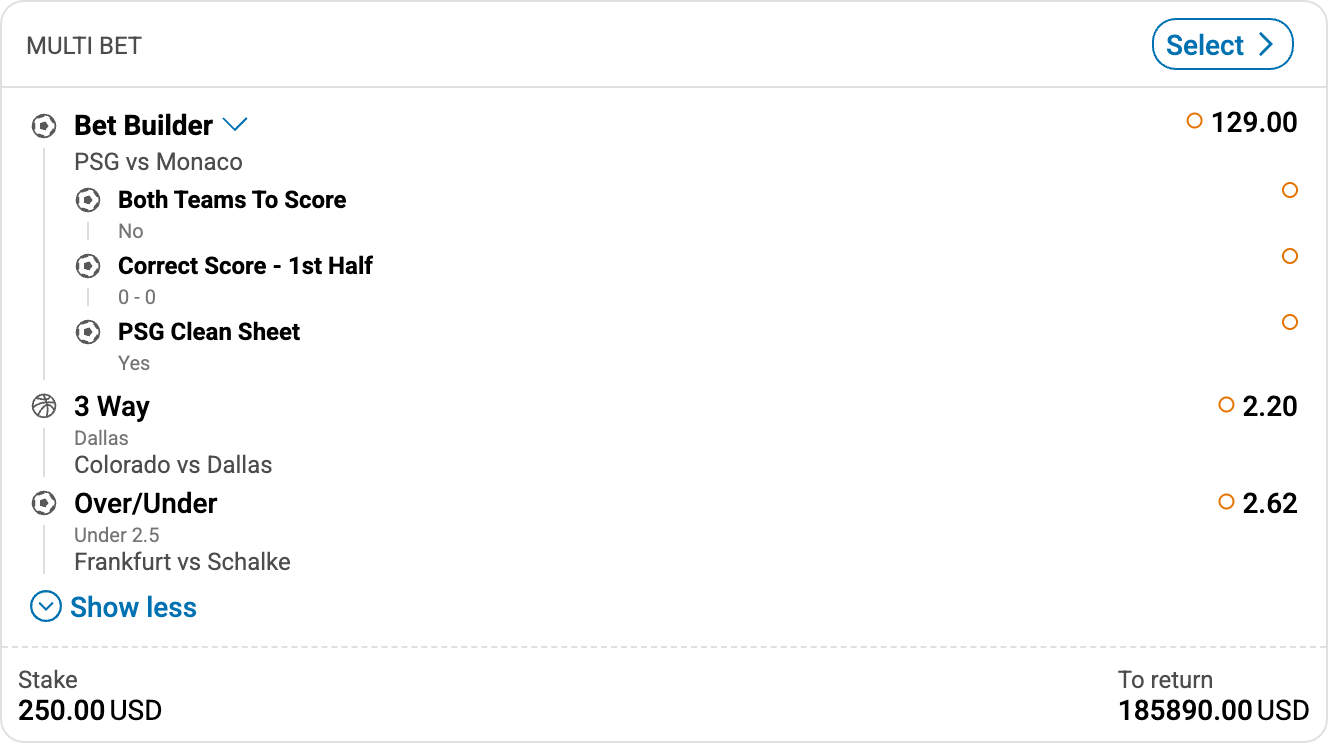
How each selection type appears on a ticket (screenshots are full tickets; note header vs body):
Expanded Table
Examples below are complete Ticket objects (version: "2.0") as returned inside TicketResponseV2.
#When type: 'uf'
Use when outcomes, markets, events, and specifiers originate from UOF. Example single ticket whose body is one standard selection:
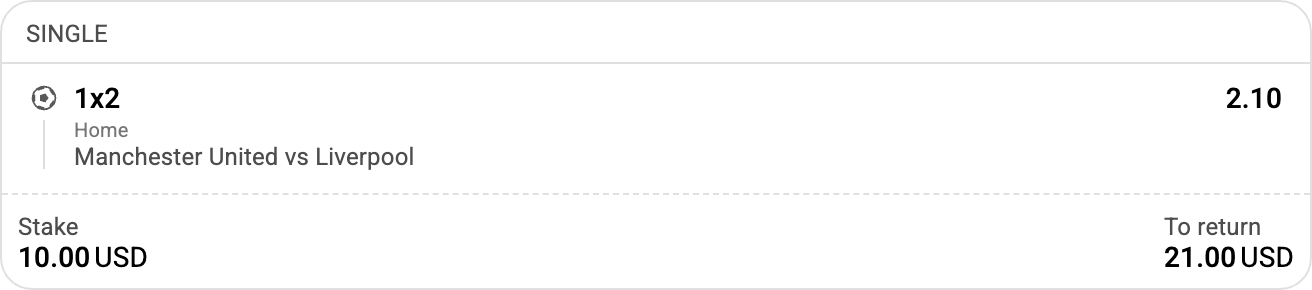
Expanded Table
const ticketUfSingle = {
  ticketId: "ticket_uf_single",
  bets: [
    {
      betId: "bet_uf",
      selections: [
        {
          type: "uf",
          productId: "1",
          eventId
#When type: 'external'
Use when outcomes, events, odds, and settlements are managed by the client. Example single ticket whose body is one standard selection:
Expanded Table
const ticketExternalSingle = {
  ticketId: "ticket_external_single",
  bets: [
    {
      betId: "bet_external",
      selections: [
        {
          type: "external",
          event: "ext:match:736977"
#When type: 'uf-custom-bet'
Custom bet (bet builder) composed of uf selections. Corresponds to Bet Builder in the UI. Example ticket: header shows BET BUILDER; body is the custom-bet group:
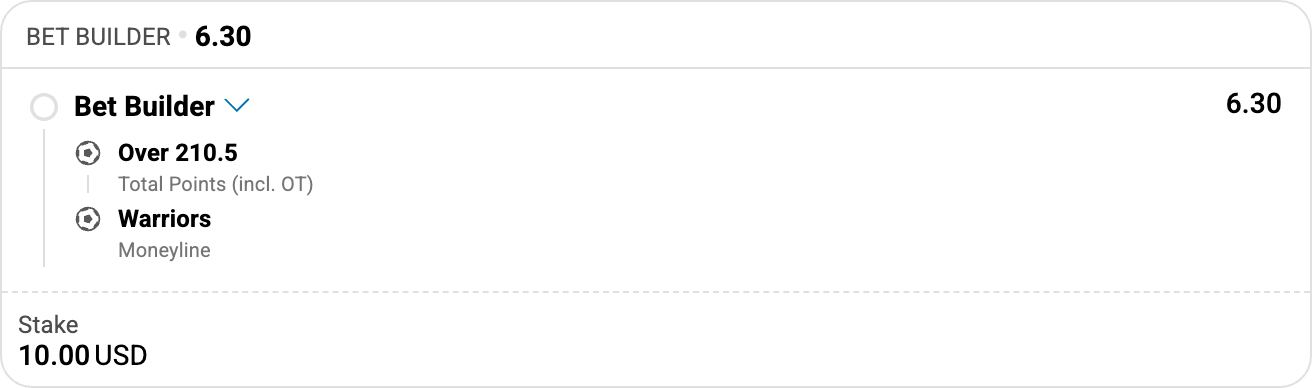
Expanded Table
const ticketCustomBetUf = {
  ticketId: "ticket_custom_bet_uf",
  bets: [
    {
      betId
#When type: 'custom-bet'
Custom bet composed of external selections. Example ticket: header shows BET BUILDER; body is the custom-bet group:
Expanded Table
const ticketCustomBetExternal = {
  ticketId: "ticket_custom_bet_external",
  bets: [
    {
      betId: "bet_custom_ext",
#When type: 'system'
Multiple selections that form a system bet. Example ticket: header shows system size and odds; body is the system group:
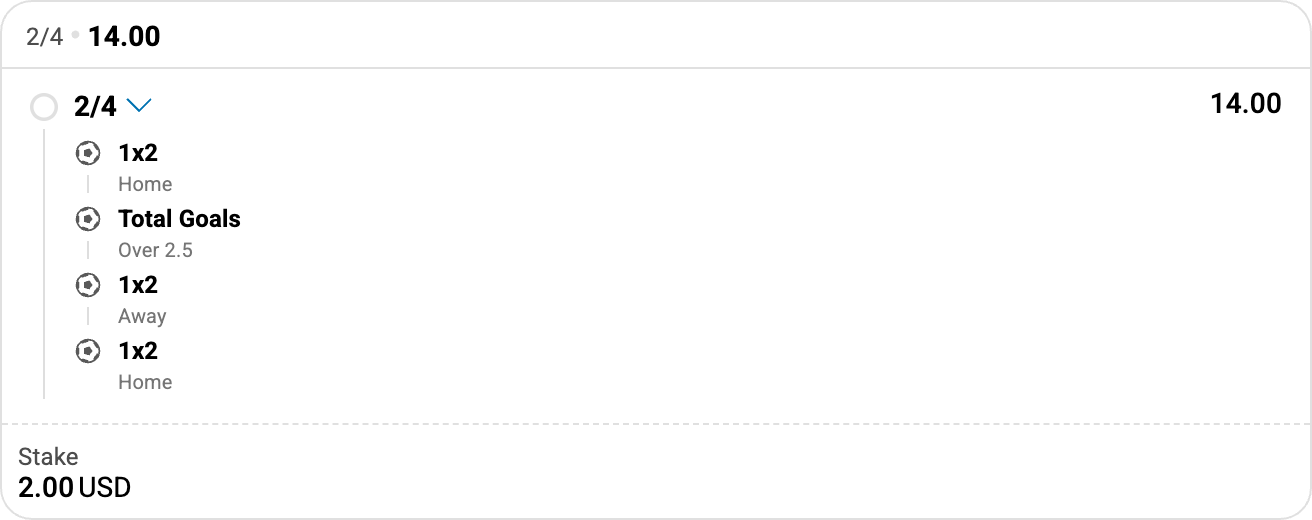
Expanded Table
const ticketSystemUfTrixie = {
  ticketId
#When type: 'odds-boost'
A uf or external selection with boosted odds. Example ticket: header shows BOOSTED ODD and the boosted value; body shows the nested pick with original odds:
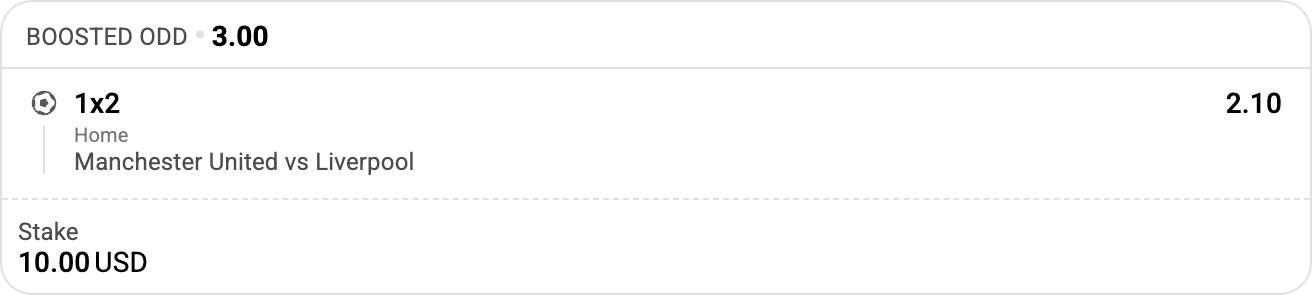
Expanded Table
| Property | Type | Required | Description |
|---|---|---|---|
| type | 'odds-boost' | yes | Indicates boosted odds |
| selection | TicketSelectionUf | TicketSelectionExternal | yes | Nested selection (uf or external) |
| odds | Odds | yes | Boosted odds for the selection |
const ticketOddsBoost = {
  ticketId: "ticket_odds_boost",
  bets: [
    {
      betId: "bet_odds_boost",
      selections: [
        {
          type: "odds-boost",
          selection: {
#When type: 'ways'
One or more selections related to an event (or market) already included elsewhere in the same bet. Example ticket: header shows WAYS; body is the ways group:
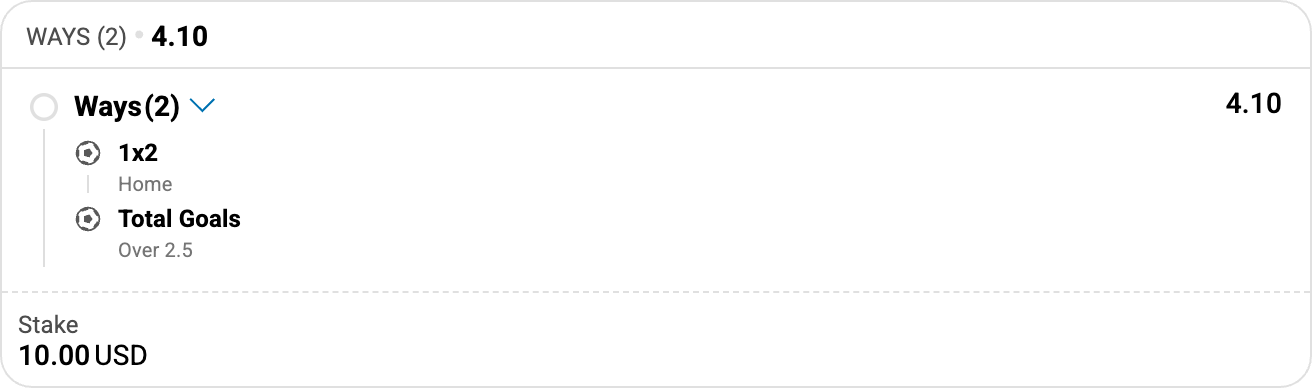
Expanded Table
| Property | Type | Required | Description |
|---|---|---|---|
| type | 'ways' | yes | Indicates ways selections |
| selections | TicketSelectionUf[] | TicketSelectionExternal[] | TicketSelectionOddsBoost[] | yes | Nested selections (uf, external, or odds-boost). Minimal = 2, maximum = 30 |
const ticketWays = {
  ticketId: "ticket_ways",
  bets: [
    {
      betId: "bet_ways",
      selections
#When type: 'payout-modifier'
A selection eligible for payout modification / promotion settlement (for example Supersub or Early Payout). Example ticket: header shows the promo label (for example 2 UP); body shows the nested pick:
Expanded Table
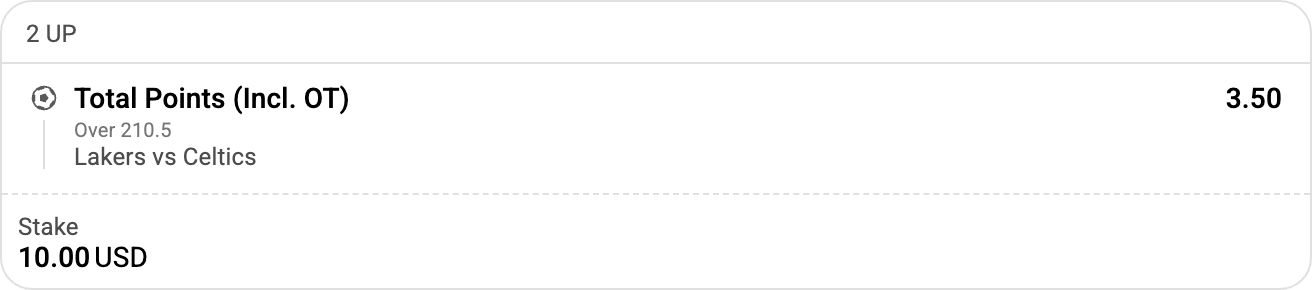
const ticketPayoutModifier = {
  ticketId: "ticket_payout_modifier",
  bets: [
    {
      betId: "bet_payout_mod",
      selections: [
        {
          type: "payout-modifier",
          reference: "promo_2up_001"
#TicketSelectionContext
Historical display metadata for uf and external ticket selections. Extends with additional custom fields (Record<string, unknown>): you may include extra keys beyond the predefined ones below.
Why it exists: Widgets need human-readable names (event, market, outcome) to render a ticket. If context is missing, the widget may call endpoints such as event or eventMarkets to resolve those names from the selection IDs. That works for recent data, but months later the same IDs may no longer be available from those endpoints. Provide context on the ticket selection so names and related display fields can be read from the ticket itself and remain usable for historical tickets.
Expanded Table
const context = {
  eventName: "Manchester United vs Liverpool",
  marketName: "1x2",
  outcomeName: "Home",
  tournament: "Premier League",
  sportName: "Soccer",
  categoryName: "England",
  isLive: false,
  eventStartTime: "1738519200000",
  sportId: "1"
};#TicketSelectionCustomBetContext
Historical display metadata for uf-custom-bet and custom-bet selections. Extends with additional custom fields (Record<string, unknown>).
Expanded Table
| Property | Type | Required | Description |
|---|---|---|---|
| eventName | string | Event or custom-bet display name (e.g., "Manchester United vs Liverpool") |
const customBetContext = {
  eventName: "Manchester United vs Liverpool & Arsenal vs Chelsea"
};#TicketSelectionSystemContext
Optional display metadata for system selections.
Expanded Table
| Property | Type | Required | Description |
|---|---|---|---|
| systemName | string | Human-readable system bet name (e.g., "Trixie", "Yankee", "Lucky 15", "Doubles") |
const systemContext = {
  systemName: "Trixie"
};
See Also: Bet, Odds, Ticket, TicketResponseV2
#Sport
Represents information about a sport.
Expanded Table
| Property | Type | Required | Description |
|---|---|---|---|
| id | string | The unique SR identifier for the sport | |
| name | string | The name of the sport | |
| icon | string | URL where the sport icon is located |
const soccer = {
  id: "1",
  name: "Soccer",
  icon: "https://example.com/icons/soccer.png"
};

const basketball = {
  id: "2",
  name: "Basketball"
};#Category
Represents information about a category (e.g., country, region).
Expanded Table
| Property | Type | Required | Description |
|---|---|---|---|
| id | string | The unique identifier assigned to the category | |
| name | string | The name of the category | |
| cc | object | Country code information | |
| cc.a2 | string | yes | Country code in A2 format (if cc object is present) |
const england = {
  id: "1",
  name: "England",
  cc: {
    a2: "GB"
  }
};

const spain = {
  id: "32",
  name: "Spain"
};#Tournament
Represents information about a tournament.
Expanded Table
| Property | Type | Required | Description |
|---|---|---|---|
| id | string | The unique identifier assigned to the tournament | |
| externalId | string | number | Your unique identifier for the tournament | |
| name | string | The name of the tournament |
const premierLeague = {
  id: "17",
  externalId: "PL2025",
  name: "Premier League"
};

const championsLeague = {
  id: "7",
  name: "UEFA Champions League"
};#Team
Represents information about a team participating in an event.
Expanded Table
| Property | Type | Required | Description |
|---|---|---|---|
| id | string | The unique SR identifier assigned to the team | |
| name | string | yes | The name of the team |
const manchesterUnited = {
  id: "sr:competitor:1",
  name: "Manchester United"
};

const liverpool = {
  name: "Liverpool FC"
};
See Also: Event
#Result
Represents result/score information for an event.
Expanded Table
| Property | Type | Required | Description |
|---|---|---|---|
| result | Array<number | string> | yes | The result of the event (e.g., scores, statistics) |
| label | string | Optional label describing what this result represents |
// Match score
const finalScore = {
  result: [2, 1],
  label: "Final Score"
};

// Half-time score
const halftimeScore = {
  result: [1, 0],
  label: "Half-time"
};

// Period scores
const periodScores = {
  result
See Also: Event
#BetSlip (Deprecated)
Represents a betting ticket containing one or more bets. Used only by deprecated BetShareResponse.
Expanded Table
const betSlip = {
  id: "ticket_123456",
  betSlipId: "654321",
  betType: "single",
  currency: "USD",
  combinedOdds: {
    decimalValue: 4.33,
    displayValue: "10/3"
  },
  stake: {
#ValueObject
Expanded Table
| Property | Type | Required | Description |
|---|---|---|---|
| value | string | yes | Displayed representation of value |
const stake = {
      value: '50.00'
};#BetSlipOddsObject
Expanded Table
| Property | Type | Required | Description |
|---|---|---|---|
| decimalValue | number | yes | Decimal representation of odds used to display change indicators |
| displayValue | string | yes | Displayed as is, representation of value |
const combinedOdds: {
    decimalValue: 4.33
    displayValue: '10/3'
};#BetSlipBetObject
Expanded Table
const bet = {
    id: 'bet_001',
    betType: '',
    markets: [
        {
            id: '1',
            name: subTitle,
            outcomes: [
                {
                    id: '1',
                    name: title,
                    odds
#BetSlipMarketObject
Expanded Table
const market = {
  id: "sr:market:321",
  name: "Moneyline",
  outcomes: [
    {
      id: "sr:outcome:101",
      name: "PSG",
      odds: "1.48",
      status: { isActive: true }
    },
    {
      id:
#BetSlipOutcomeObject
Expanded Table
const outcome = {
  id: "sr:outcome:67898",
  name: "Denver Nuggets",
  oddsDecimal: 2.55,
  status: { isActive: true }
};#BetSlipEventObject
Expanded Table
const event = {
  id: "sr:event:98765",
  externalId: "123456",
  name: "Heat VS Nuggets",
  teams: [
    { id: "sr:competitor:113", name: "Miami Heat" },
    { id: "sr:competitor:118", name: "Denver Nuggets" }
  ]
};
See Also: BetShareResponse, TicketsResponse
#MatchEvent
Represents a match event (incident) that occurred during a sporting event, such as a goal, red card, or substitution.
Expanded Table
| Property | Type | Required | Description |
|---|---|---|---|
| type | string | yes | UPPER_CASE event type identifier (see Type Values below) |
| metadata | object | null | Additional data whose shape depends on type (see Metadata by Type below) | |
| tag | string | Deprecated. Channel identifier from which this match event originated. Prefer using channelId/channelOriginId passed separately in the request |
#Type Values
Soccer
Expanded Table
Basketball
Expanded Table
| Value | Description |
|---|---|
ONE_POINT_SCORED | A free throw (1-point score) was made |
TWO_POINT_SCORED | A 2-point basket was scored |
THREE_POINT_SCORED | A 3-point basket was scored |
TIMEOUT | A timeout was called |
PLAYER_EJECTED | A player was ejected (disqualified) |
QUARTER_STARTED | A new quarter began |
Tennis
Expanded Table
| Value | Description |
|---|---|
GAME_WON | A game was won |
BREAK_WON | A break of serve was won |
SET_WON | A set was won |
SET_STARTED | A new set began (set 2 onward) |
FIRST_SET_STARTED | The first set began |
Cross-sport
Expanded Table
| Value | Description |
|---|---|
MATCH_STARTED | The match began |
MATCH_ENDED | The match ended |
TOURNAMENT_MATCH_START_IN_ONE_DAY | Scheduled match starts in 1 day |
TOURNAMENT_MATCH_START_IN_ONE_HOUR | Scheduled match starts in 1 hour |
TOURNAMENT_MATCH_START_IN_FIVE_MINUTES | Scheduled match starts in 5 minutes |
#Metadata by Type
Expanded Table
// Soccer: 2nd goal scored
const goalEvent = {
  type: "GOAL",
  metadata: { goal_number: "2" }
};

// Soccer: penalty kick awarded to the home team
const penaltyEvent = {
  type: "PENALTY_KICK",
  metadata: { team: "home" }
};
#Adapter Config
#BrEventListConfig
Configuration for the bet recommendation event list widget. Note: The allowedMarkets and blockedMarkets properties are only applicable when using hosted Sportradar type with UOF (Unified Odds Feed) IDs.
Expanded Table
| Property | Type | Required | Description |
|---|---|---|---|
| layout | EventListMarketsConfig | yes | Market layout configuration per sport |
| allowedMarkets | SportMarketsMap | Markets allowed for this widget, keyed by sport ID | |
| blockedMarkets | SportMarketsMap | Markets blocked for this widget, keyed by sport ID |
const brEventListConfig = {
  layout: {
    "1": {  // Soccer
      sportId: 1,
      markets: [
        {
          title: "1X2",
          preMatchMarketId: 1,
          liveMarketId: 1,
See Also: EventListMarketsConfig, SportMarketsMap
#SportMarketsMap
A map of sport IDs to their market configurations with specifier filtering. Only applicable when using hosted Sportradar type with UOF (Unified Odds Feed) IDs.
Expanded Table
| Property | Type | Required | Description |
|---|---|---|---|
| [sportId] | Record<string, Specifiers> | yes | Market configurations for a sport, where keys are market IDs and values are specifier filters |
Specifiers Type (true | false | null | undefined | '' | SpecifierRule[]):
Expanded Table
| Value | Meaning |
|---|---|
true | Allow/block this market id regardless of specifiers |
false / null / undefined / '' | Allow/block only when the market has no specifiers |
SpecifierRule[] | Allow/block when any rule matches (OR). Rules are for markets with specifiers only |
SpecifierRule (array entry):
Expanded Table
| Form | Example | Meaning |
|---|---|---|
| Legacy pipe string | "total=2.5|variant=sr:exact" | Exact key/value set (order of keys ignored) |
| Structured object | { total: true, variant: "sr:exact" } | Exact key set; each key constrained (see below) |
Per-key constraint in a structured rule:
Expanded Table
| Constraint | Meaning |
|---|---|
true | Any value for that key |
string | Exact value |
string[] | Value must be one of the listed values |
Structured rules require the market to have exactly those specifier keys (no missing keys, no extra keys).
const sportMarketsMap = {
  "1": {                                      // Soccer (sport ID 1)
    "1": true,                                // 1X2 - any / no specifiers
    "10": false,                              // Double Chance - no specifiers only
    "18": ["total=2.5", "total=3.5"],         // Total - exact legacy strings
    "16": [{ hcp:
#EventListMarketsConfig
Configuration for market layout display in event lists. This is a Record<string, SportLayoutConfig> where keys are sport IDs and values are layout configurations.
Type: Record<string, SportLayoutConfig>
#SportLayoutConfig
Expanded Table
| Property | Type | Required | Description |
|---|---|---|---|
| sportId | string | number | yes | Sport identifier |
| markets | MarketLayoutConfig[] | yes | Array of market layout configurations |
#MarketLayoutConfig
Expanded Table
#ColumnConfig
Expanded Table
| Property | Type | Required | Description |
|---|---|---|---|
| id | string | yes | Outcome ID to display in this column |
| title | string | Custom column title | |
| tKey | string | Translation key for the column title |
const eventListMarketsConfig = {
  "1": {  // Soccer
    sportId: 1,
    markets: [
      {
        title: "1X2",
        preMatchMarketId: 1,
        liveMarketId: 1,
        columns: ["1", "X", "2"
See Also: BrEventListConfig