Virtual Stadium offers extensive customization options to match your brand identity and user experience requirements. You can customize the visual appearance through CSS styling, replace default icons with your own branded assets, and even customize text translations.
This guide covers all available customization options for the Virtual Stadium widget.
Custom styling offers customers the flexibility to tailor the aesthetics of the Virtual Stadium widget to their precise requirements. This is accomplished by applying custom CSS properties to the widget's underlying HTML components. All customization takes place within the specified scope of the .sr-bb.sr-virtualStadium selector class, enabling customers to effectively alter the default visual presentation.
The srct-vs classes are designated styling classes for the Virtual Stadium. It's recommended to use the CSS properties listed below with these classes. While you can use other CSS properties as well, it's not advised. Using spacing properties like radius | top | padding | margin might cause issues with future updates to your setup.
| Class Name | Description |
|---|---|
srct-vs-announcement | Wrapper for an announcement banner or message. |
srct-vs-announcement-icon | Icon displayed alongside the announcement text. |
srct-vs-announcement-close-icon | Icon for closing or dismissing the announcement. |
| Class Name | Description |
|---|---|
srct-vs-color__info | Styles elements with an "info" color. |
srct-vs-color__warning | Styles elements with a "warning" color. |
srct-vs-color__error | Styles elements with an "error" color. |
| Class Name | Description |
|---|---|
srct-vs-countdown__color-info | Applies "info" styling to countdown elements. |
srct-vs-countdown__color-warning | Applies "warning" styling to countdown elements. |
srct-vs-countdown__color-error | Applies "error" styling to countdown elements. |
| Class Name | Description |
|---|---|
srct-vs-drawer | Main container for the drawer UI. |
srct-vs-drawer__button | Generic button class for actions within the drawer. |
srct-vs-drawer__open-button | Button that opens or expands the drawer. |
srct-vs-drawer__close-button | Button that closes or collapses the drawer. |
srct-vs-drawer__entry | Individual entry or item within the drawer. |
| Class Name | Description |
|---|---|
srct-vs-live-data-bg | Background or overlay used when live data is displayed. |
srct-vs-live-data-bg-overlay | Additional overlay or style on top of the live data background. |
| Class Name | Description |
|---|---|
srct-vs-progress-bar | Container for the progress bar. |
srct-vs-progress-bar__background | Background or track behind the progress bar's fill. |
| Class Name | Description |
|---|---|
srct-vs-quote | Container for a quoted message. |
srct-vs-quote__vip | Styles a VIP-specific quote (e.g., color or icon). |
srct-vs-quote__icon | Icon placed next to the quoted content. |
srct-vs-quote__post | The post content being quoted. |
srct-vs-quote__message-header | Header area for the quoted message. |
srct-vs-quote__message | Actual text of the quoted message. |
| Class Name | Description |
|---|---|
srct-vs-reactions | Container for reaction icons or emojis. |
srct-vs-reactions__selected-reaction | Indicates which reaction the user has selected. |
srct-vs-reactions__reaction-icon | Icon or emoji representing a specific reaction. |
srct-vs-reactions__custom-reaction | Styles a custom reaction icon or emoji. |
| Class Name | Description |
|---|---|
srct-vs-channel-tag | Styles a channel tag (e.g., #channel) mention. |
srct-vs-user-tag | Styles a user tag (e.g., @username) mention. |
| Class Name | Description |
|---|---|
srct-vs-user-profile | Main container for the user profile card or dialog. |
srct-vs-user-profile__card | Styles the user's profile card, including the avatar or stats. |
srct-vs-user-profile__stats | Container for user statistics. |
srct-vs-user-profile__stat | Individual stat (e.g., number of posts, achievements, etc.). |
srct-vs-user-profile__stat-value | Numeric or text value of a user stat. |
Icons in Virtual Stadium can be replaced with custom icons by providing branding property when integrating widget to a site. All general icons, match event icons such as goal, offside... and sport icons can be customized by inserting icon path (svg or png) as a value.
Default icons can be changed by providing branding prop to widget integration.
Svg files must have id="icon" property on <svg> element.
SIR("addWidget", ".sr-widget-1", "virtualstadium", {
branding: {
namespaces: {
virtualStadium: {
icons: {
send: { // Icon ID from upper table
icon: "path_to_your_image_file",
label: "label_here" // 'alt' tag value
Sport icons can be changed by providing branding prop to widget integration.
Sport Icons are used in Bet slip based on the provided sportId.

SIR('addWidget', '.sr-widget-1', 'virtualstadium', {
branding: {
sports: {
icons: {
1: 'path_to_your_image_file', // key is a ID from upper table
2: 'path_to_your_image_file',
default: 'path_to_your_image_file' // fallback icon for all sports
}
}
},
...restProps
Event icons can be changed by providing branding prop to widget integration.
Event icons are used when the new event is being rendered.
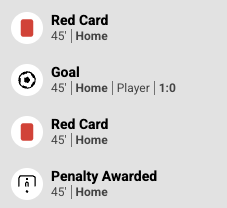
SIR('addWidget', '.sr-widget-1', 'virtualstadium', {
branding: {
events: {
icons: {
goal: {
// Icon ID from upper table
icon: 'path_to_your_image_file',
label: 'label_here'
},
offside: {
icon:
| Class Name | Description |
|---|---|
srct-vs-bet-insights | Main container for the Bet Insights section. |
srct-vs-bet-insights-button | Button that triggers a scroll or navigation event. |
srct-vs-bet-insights__counter | Displays a numeric counter (e.g., how many insights are shown). |
srct-vs-bet-insights__market-name | Displays the name of the current market. |
srct-vs-bet-insights__bubble-new | Indicator for newly added or updated bet insights. |
srct-vs-bet-insights__new-flash-bet-badge | Badge indicating newly introduced Flash Bet opportunities. |
srct-vs-bet-insights__new-flash-bet-badge-loading | Loading state styling for the new Flash Bet badge. |
srct-vs-bet-insights__outcome | Container for a single outcome element. |
srct-vs-bet-insights__outcome-value | Displays the value of the outcome. |
srct-vs-bet-insights__outcome-selected | Highlights or styles a selected outcome. |
srct-vs-bet-insights__outcome-disabled | Styles an outcome that is disabled or unavailable. |
srct-vs-bet-insights__collapse-button | Button to collapse the Bet Insights UI. |
srct-vs-bet-insights__collapse-button-icon | Icon associated with the collapse button. |
srct-vs-bet-insights__expand-button | Button to expand the Bet Insights UI. |
srct-vs-bet-insights__expand-button-count | Displays the number of items to show. |
srct-vs-bet-insights__expand-button-icon | Icon associated with the expand button. |
| Class Name | Description |
|---|---|
srct-vs-betslip | Main container for the bet slip. |
srct-vs-betslip__wrapper | Wrapper around the core bet slip content. |
srct-vs-betslip__bet-builder | Container for bet builder elements or features. |
srct-vs-betslip__header | Header area displaying bet slip title or summary. |
srct-vs-betslip__select-button | Button to select or activate a bet slip. |
srct-vs-betslip__shared-indicator | Indicates that the bet slip is shared. |
srct-vs-betslip__select-icon | Icon displayed on the select button. |
srct-vs-betslip__section | Divider or section area within the bet slip. |
srct-vs-betslip__copied | Styling for a "copied" or confirmation state (e.g., when a code or link is copied). |
srct-vs-betslip__sport-icon | Sport-specific icon displayed in the bet slip. |
srct-vs-betslip__copy | Button or element for copying the bet slip link or code. |
srct-vs-betslip__copy-button | The actual button used to trigger the copy action. |
srct-vs-betslip__copy-button-cta | Additional CTA or label for the copy button. |
srct-vs-betslip__market | Container for a specific market within the bet slip. |
srct-vs-betslip__market-match | Displays match or event details for this market. |
srct-vs-betslip__market-outcome | Represents an outcome within the market. |
srct-vs-betslip__market-name | Name or label of the market (e.g., "Totals"). |
srct-vs-betslip__market-circle | Visual circle indicator or icon related to the market. |
srct-vs-betslip__market-more | Link or button to expand additional market options. |
srct-vs-betslip__market-line | Indicates a line or threshold for this market. |
srct-vs-betslip__footer | Footer area of the bet slip. |
srct-vs-betslip__footer-title | Title text in the footer (e.g., "Total Odds"). |
srct-vs-betslip__footer-value | Displays the numeric value (e.g., total odds or stake). |
srct-vs-betslip__footer-currency | Displays the currency symbol or code in the footer. |
| Class Name | Description |
|---|---|
srct-vs-betslip-share__header | Header area for the bet slip share component. |
srct-vs-betslip-share__button | Generic button for actions within the share interface. |
srct-vs-betslip-share__composer | Composer area specifically for bet slip sharing. |
srct-vs-betslip-share__message | Message or text area accompanying the bet slip share. |
srct-vs-betslip-share__header-title | Title displayed in the share header. |
srct-vs-betslip-share__new-bet-button | Button to create or start a new bet. |
srct-vs-betslip-share__new-bet-button:disabled | Disabled state for the new bet button. |
srct-vs-betslip-share__header-icon | Icon displayed in the share header. |
srct-vs-betslip-share__post-button | Button to post the bet slip to a channel. |
srct-vs-betslip-share__pill-button | Pills or toggle buttons within the share interface. |
srct-vs-betslip-share__pill-button-selected | Selected or active state for pill buttons. |
srct-vs-betslip-share__container-background | Background styling for the overall share container. |
| Class Name | Description |
|---|---|
srct-vs-channel-navigation | Wrapper for the channel navigation panel. |
srct-vs-channel-navigation__expand-button | Button to expand or collapse the channel navigation. |
srct-vs-channel-navigation__active-matches | Section displaying matches currently active within a channel. |
srct-vs-channel-navigation__list | Container for the channel navigation list. |
srct-vs-channel-navigation__list-channel-name | Styles the channel name item within the list. |
srct-vs-channel-navigation__list-chat-icon | Icon indicating a chat is associated with the channel. |
srct-vs-channel-navigation__list-user-count | Displays how many users are currently in a specific channel. |
srct-vs-channel-navigation__list-chat-select | Item or button to select/open the channel chat. |
srct-vs-channel-navigation__list-divider | Divider or separator between channel list items. |
| Class Name | Description |
|---|---|
srct-vs-composer__share-bet-slip-button | Button for sharing a bet slip within the composer. |
srct-vs-composer__input-row | Wrapper for input elements in the composer. |
srct-vs-composer__input | Default styling for the composer's text input. |
srct-vs-composer__input:disabled | Disabled state for the composer's input. |
srct-vs-composer__input-validation-message | Validation error or warning message for the input. |
srct-vs-composer__send-button | Button to send or submit composer content. |
srct-vs-composer__send-button:disabled | Disabled state for the send button. |
srct-vs-composer__channel-tag-highlighter | Highlights channel tags (e.g., #channel) within the input. |
srct-vs-composer__suggestion-list | Container for all suggestion items. |
srct-vs-composer-suggestion__list-active-item | Styles the currently active or hovered suggestion. |
srct-vs-composer-suggestion__divider | Divider between suggestion items. |
srct-vs-composer-suggestion__name | Styles the name text for each suggestion. |
| Class Name | Description |
|---|---|
srct-vs-flash-bet | Main container for the Flash Bet section. |
srct-vs-flash-bet__header | Header area containing the title and other Flash Bet info. |
srct-vs-flash-bet__title | Displays the title text within the Flash Bet section. |
srct-vs-flash-bet__market | Container for market-related content. |
srct-vs-flash-bet__market-name | Displays the name of the current market. |
srct-vs-flash-bet__outcomes | Container for all outcome elements under the selected market. |
srct-vs-flash-bet__outcome | Individual outcome element. |
srct-vs-flash-bet__outcome-value | Displays the odds or numeric value of an outcome. |
srct-vs-flash-bet__outcome-name | Displays the descriptive name (e.g., team or event) of an outcome. |
srct-vs-flash-bet__collapse-icon | Icon indicating that the section can be collapsed. |
srct-vs-flash-bet__expand-button | Button to expand the Flash Bet UI or additional content. |
srct-vs-flash-bet__expand-icon | Icon indicating that the section can be expanded. |
srct-vs-flash-bet__countdown | Timer or countdown display for time-sensitive bets. |
srct-vs-flash-bet__countdown-background | Background or overlay behind the countdown element. |
| Class Name | Description |
|---|---|
srct-vs-chat | Container or wrapper for the chat component. |
srct-vs-alert | Styles for alert messages or notifications. |
srct-vs-switch | Used for toggling settings or features within the UI. |
srct-vs-avatar | Displays user avatars, typically in chat or profile sections. |
srct-vs-vip-badge | Styles the VIP badge icon or label for special users. |
srct-vs-peninsula | Generic class for a "peninsula" style container or feature. |
srct-vs-container | Generic container class for layout structure. |
srct-vs-floating-button | Styles a floating action button or CTA in the interface. |
srct-vs-contact-support | Button or link to contact customer support. |
srct-vs-scroll-to-bottom-button | Button to scroll a container (e.g., a chat log) to its bottom. |
| Class Name | Description |
|---|---|
srct-vs-message | Wrapper for a single chat or timeline message. |
srct-vs-message__my-message | Styles the user's own messages differently from others. |
srct-vs-message__timeline | Special styling for timeline events or updates. |
srct-vs-message__vip | Indicates a VIP user's message. |
srct-vs-message__empty | Styling for an empty message state. |
srct-vs-message__reported | Styling for a message that has been reported. |
srct-vs-message__header | Header area of the message, may contain user info or a timestamp. |
srct-vs-message-header__event-title | Title text within the message header. |
srct-vs-message-header__event-subtitle | Subtitle text within the message header. |
srct-vs-message__content | Container for the main message text. |
srct-vs-message__avatar | Avatar or profile image associated with the message sender. |
| Class Name | Description |
|---|---|
srct-vs-navigation | Main container for the navigation bar or menu. |
srct-vs-navigation__header | Header area of the navigation, which may contain a title or branding. |
srct-vs-navigation__button | Navigation button for toggling menus or performing actions. |
srct-vs-navigation__close | Button or icon for closing a navigation panel. |
srct-vs-navigation__back | Button or icon for navigating back (e.g., to a previous screen). |
srct-vs-navigation__live-data-toggle | Toggle for switching live data on/off. |
srct-vs-navigation__tournament-name | Displays the name of a tournament or league in the navigation. |
| Class Name | Description |
|---|---|
srct-vs-report__container | Main wrapper for the "report" dialog or modal. |
srct-vs-report__icon | Icon indicating a report or complaint. |
srct-vs-report__title | Title text for the report section. |
srct-vs-report__content | Main content area of the report interface. |
srct-vs-report__quote | Container for quoted text (if any) in a report. |
srct-vs-report__quote-message | Styles the quoted message content. |
srct-vs-report__cancel-button | Button to cancel or close the report interface. |
srct-vs-report__button | Button to submit the report. |
srct-vs-report__text | Additional text or instructions for the user. |
| ID | Icon |
|---|---|
| send | |
| betshare | |
| suspended | |
| close | |
| close_in_circle | |
| warning | |
| error | |
| report | |
| quote | |
| copy_bet | |
| show_more | |
| arrow_right | |
| arrow_down | |
| spinner | |
| menu | |
| live_feed | |
| lmt_compact | |
| close_negative | |
| toggle | |
| virtual_stadium_button | |
| betslip_empty | |
| chat_empty | |
| navigate |
| Sport | ID | Icon |
|---|---|---|
| Soccer | 1 | |
| Basketball | 2 | |
| Baseball | 3 | |
| Ice Hockey | 4 | |
| Tennis | 5 | |
| Handball | 6 | |
| Floorball | 7 | |
| Golf | 9 | |
| Boxing | 10 | |
| Rugby | 12 | |
| Aussie Rules | 13 | |
| Bandy | 15 | |
| Football | 16 | |
| Snooker | 19 | |
| Table Tennis | 20 | |
| Cricket | 21 | |
| Darts | 22 | |
| Volleyball | 23 | |
| Field Hockey | 24 | |
| Pool | 25 | |
| Waterpolo | 26 | |
| Curling | 28 | |
| Futsal | 29 | |
| Badminton | 31 | |
| Bowls | 32 | |
| Chess | 33 | |
| Beach Volley | 34 | |
| Squash | 37 | |
| Rink Hockey | 38 | |
| Lacrosse | 39 | |
| Beach Soccer | 60 | |
| Pesapallo | 61 | |
| Esport | 107 | |
| Counter Strike | 109 | |
| League Of Legends | 110 | |
| Dota 2 | 111 | |
| Starcraft | 112 | |
| Hearthstone | 113 | |
| MMA | 117 | |
| Call Of Duty | 118 | |
| Smite | 119 | |
| Overwatch | 121 | |
| Rainbow Six | 125 | |
| Rocket League | 128 | |
| King Of Glory | 134 | |
| Gaelic Football | 135 | |
| Gaelic Hurling | 136 | |
| Esport Soccer | 137 | |
| Kabaddi | 138 | |
| Esport Basketball | 153 | |
| Basketball 3x3 | 155 | |
| Beach Handball | 157 | |
| Arena Of Valor | 158 | |
| Valorant | 194 | |
| Esport Ice Hockey | 195 |
| Event | ID | Icon |
|---|---|---|
| Goal | goal | |
| Yellow Card | yellowCard | |
| Red Card | redCard | |
| Corner | corner | |
| Free Kick | freeKick | |
| Throw In | throwIn | |
| Offside | offside | |
| Penalty Kick | penaltyKick | |
| Penalty Shootout | penaltyShootout | |
| Shot on Target | shotOnTarget | |
| 1 Point Scored | onePtScored | |
| 2 Points Scored | twoPtScored | |
| 3 Points Scored | threePtScored | |
| Player Ejected | playerEjected | |
| Timeout | timeout | |
| Game Won | gameWon | |
| Set Point Won | setPointWon | |
| Break Point Won | breakPointWon | |
| Soccer - default | defaultSoccer | |
| Basketball - default | defaultBasketball | |
| Tennis - default | defaultTennis | |
| Default | default |